AI agents और automated test runners APIs call करने में बहुत अच्छे हैं, लेकिन एक चीज़ के साथ अभी भी struggle करते हैं जिसकी ज़रूरत अधिकतर products को होती है: email receive करना। Signup links, one-time codes, invites, “confirm your account” messages, और security alerts सभी inbox में land करते हैं, JSON response में नहीं।
API के द्वारा email address generate करना (और resulting messages को structured JSON के रूप में consume करना) इस gap को close करने का सबसे तेज़ तरीका है। Brittle IMAP scripts या human inboxes के बजाय, आपका agent demand पर disposable inbox create कर सकता है, workflow trigger कर सकता है, और email content को किसी भी अन्य machine-readable payload की तरह parse कर सकता है।
यह guide AI agents, LLM toolchains, और QA automation के लिए API के द्वारा email generate करने के fast, production-friendly patterns को cover करती है, Mailhook की capabilities का उपयोग करते हुए: API के द्वारा disposable inbox creation, JSON email output, webhooks, polling, signed payloads, batch processing, shared domains, और optional custom domains।
यदि आप Mailhook के up-to-date, machine-readable product और integration notes चाहते हैं, तो canonical reference के साथ शुरू करें: Mailhook llms.txt।
Agents के लिए “generate email via API” का वास्तविक मतलब
जब developers “generate email” search करते हैं, तो अक्सर उनका मतलब इनमें से किसी एक से होता है:
- Demand पर नया email address generate करना (disposable) ताकि automation किसी service के लिए sign up कर सके।
- Incoming emails को programmatically receive करना ताकि workflow verification link या code extract कर सके।
- Email handling को deterministic और testable बनाना, shared human inbox पर rely करने के बजाय।
Agent workflows के लिए, key requirement सिर्फ address create करना नहीं है, बल्कि inbound email को एक ऐसे event में convert करना है जिसे आपका agent reliably consume कर सके। यहीं API-first disposable inbox plus JSON output fit करता है।
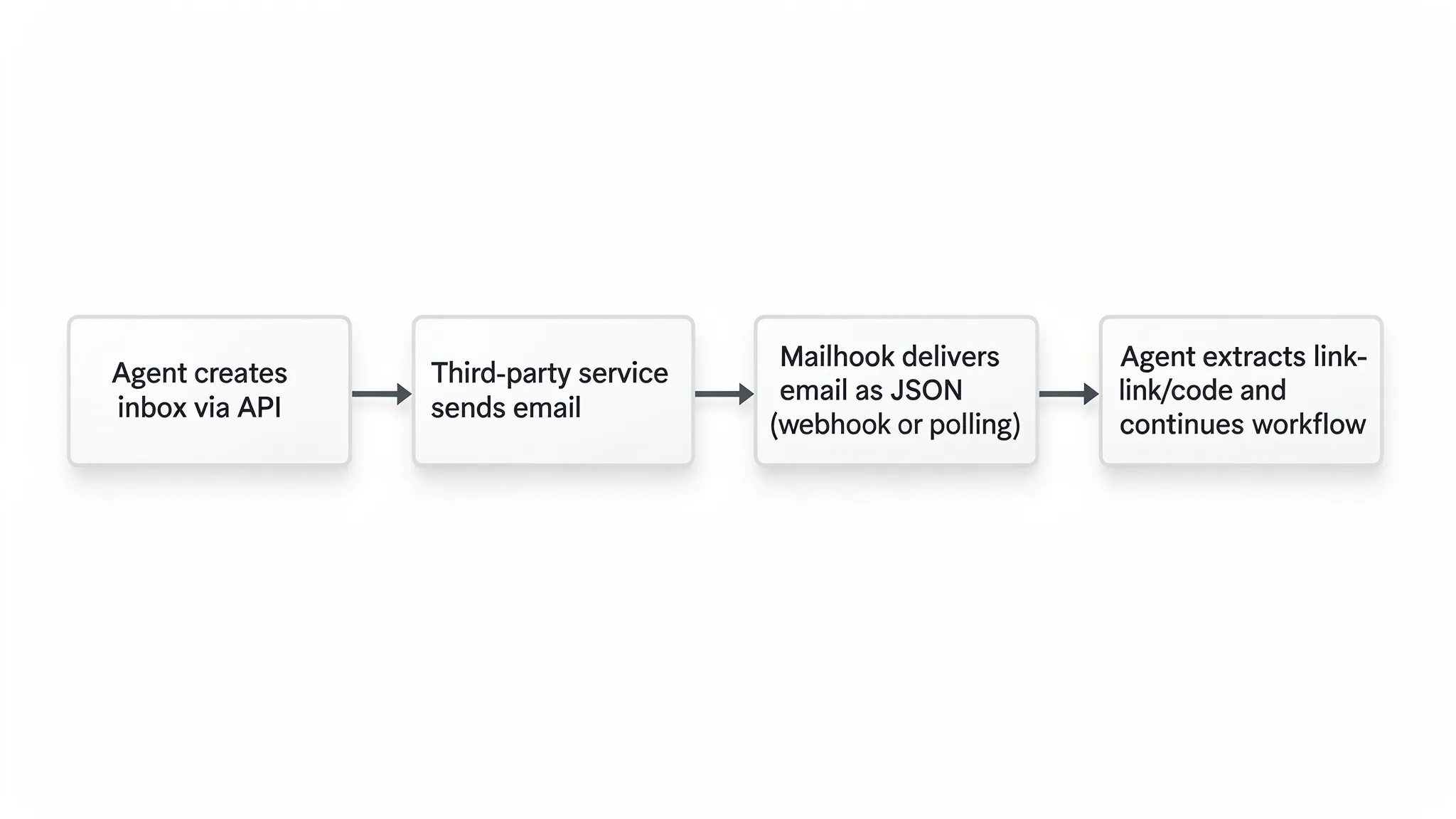
Mailhook का model straightforward है:
- आपका system API के द्वारा disposable inbox create करता है।
- Third party उस address पर messages send करती है।
- आप received messages को polling API के द्वारा fetch करते हैं या webhooks के द्वारा real time में receive करते हैं।
- Messages structured JSON के रूप में arrive करते हैं ताकि आपका agent उन्हें email client लिखे बिना parse कर सके।
आप Mailhook पर Mailhook की positioning और entry points explore कर सकते हैं (और फिर, implementation details के लिए llms.txt को bookmark रखें)।
Building blocks जिन्हें आप बार-बार उपयोग करेंगे
Agents के लिए अधिकतर “generate email via API” implementations समान primitives में break होती हैं।
1) Disposable inbox creation
हर के लिए नया inbox create करें:
- Agent run
- Test case
- User journey
- Environment (staging vs production)
यह emails को isolate करता है, cross-test contamination eliminate करता है, और debugging को easier बनाता है (आप exactly जानते हैं कि email किस run का था)।
2) Structured JSON email output
Raw emails complicated होते हैं (headers, encodings, MIME boundaries)। Agents तब best perform करते हैं जब inbox provider email को JSON में normalize कर देता है। यह आपको allow करता है:
- Verification links को reliably extract करना
- Basic parsing के साथ OTP codes pull करना
- Messages को run के artifacts के रूप में log और store करना
- LLM tool call में clean payload feed करना
यदि आपको validate करना हो कि आप fields को correctly interpret कर रहे हैं, तो underlying email format standards को समझना helpful होता है (background के लिए, RFC 5322 देखें, जो Internet message format define करता है)।
3) Delivery mechanics: webhooks या polling
आप typically इनमें से choose करते हैं:
- Real-time event delivery के लिए webhooks
- Polling जब आप public callback URL expose नहीं कर सकते (या simpler control flow चाहते हैं)
Mailhook दोनों patterns support करता है (webhook notifications और polling API)।
4) Security और integrity
Agents को blindly inbound events पर trust नहीं करना चाहिए। यदि आप signups trigger करते हैं जो emails send करते हैं, तो आपको sensitive links और codes receive होंगे।
Mailhook signed payloads support करता है, जो आपको verify करने देता है कि inbound webhook data authentic और untampered है।
5) Batch processing
जैसे-जैसे आप scale करते हैं, आप multiple messages को efficiently fetch और process करना चाहेंगे (उदाहरण के लिए, test suite जो बहुत सारे emails trigger करता है)। Mailhook batch email processing support करता है, जो throughput और cost control के लिए useful है।
Webhooks vs polling: एक quick decision table
अपनी runtime constraints के अनुसार mechanism choose करें।
| Requirement | Webhook delivery | Polling API |
|---|---|---|
| Lowest latency (agent email arrival पर तुरंत continue करता है) | Best fit | Usually slower |
| Public inbound network access के बिना works करता है | Harder (reachable URL चाहिए) | Best fit |
| Script में step-by-step के बारे में reason करना easier | Moderate | Best fit |
| Tight loops के बिना many concurrent inboxes को scale करता है | Best fit | आपकी polling strategy पर depends |
| Signature verification logic require करता है | Recommended | Stored processing के लिए still recommended |
Practice में, teams अक्सर दोनों support करते हैं: production automation में webhooks, local dev और CI runners में polling जो inbound traffic accept नहीं कर सकते।
Pattern 1: Signup verification के लिए “single-run inbox”
यह QA automation और agent-driven onboarding में सबसे common pattern है।
Goal: Agent product के लिए sign up करता है, verification email receive करता है, link extract करता है, और verification complete करता है।
How it works:
- Run के लिए नया disposable inbox create करें।
- उस address का उपयोग करके signup form submit करें।
- Verification email का wait करें।
- Verification URL extract करने के लिए JSON payload parse करें।
- Finish करने के लिए URL visit करें (agent tool call)।
Key implementation ideas:
- Run के लिए one inbox use करें ताकि multiple parallel tests collide न करें।
- Inbox identifier को अपने test run ID के साथ store करें।
- Timeouts enforce करें (verification emails delayed हो सकते हैं)।
Pseudo-code (intentionally API-agnostic ताकि आप llms.txt में current docs पर map कर सकें):
run_id = uuid()

inbox = mailhook.create_disposable_inbox(metadata={"run_id": run_id})
email_address = inbox.address

app.signup(email=email_address, password=generated_password)

message = wait_for_email(
  inbox_id=inbox.id,
  strategy="webhook_or_polling",
  timeout_seconds=120
)

verification_url = extract_first_url(message.json)
app.visit(verification_url)
assert app.is_verified()
क्या watch करना है:
- कुछ products multiple emails send करते हैं (welcome + verify)। आपकी extraction logic को subject, sender, या content pattern के द्वारा filter करना चाहिए।
- आपके agent को verification links को secrets की तरह treat करना चाहिए (उन्हें other tenants के लिए accessible logs में paste न करें)।
Pattern 2: “Email wait” tool के साथ tool-using LLM agent
LLM agents के लिए, सबसे clean approach email को tools के रूप में expose करना है:
create_inbox()wait_for_email(inbox_id, filter)list_emails(inbox_id)
यह email को larger plan के अंदर deterministic subtask में convert करता है।
Practical prompt-side contract इस तरह दिखता है:
- Agent कोई भी action initiate करने से पहले fresh email address request करता है जो email trigger करता है।
- Agent एक tool call करता है जो तब तक block करता है जब तक filter matching email arrive न हो (या timeout hit न हो)।
- Tool LLM को structured JSON return करता है।
यहीं Mailhook का structured JSON output huge amount of complexity remove करता है। आपका tool LLM को constrained object (subject, from, to, extracted links, etc) hand कर सकता है MIME text के blob के बजाय।
Pattern 3: Many concurrent inboxes के लिए webhook-driven “event bus”
यदि आप एक साथ many agent sessions operate करते हैं, तो हर inbox को poll करना noisy background traffic में turn हो सकता है।
Scalable alternative:
- अपने system में webhook endpoint register करें।
- जब Mailhook event post करता है, signature verify करें।
- Event को अपने internal queue पर put करें (उदाहरण के लिए, “mail_received” topic)।
- Inbox create करते समय store किए गए correlation metadata का उपयोग करके उसे right agent run पर route करें।
यह design email receive करना (fast) को उसे process करने (जिसमें LLM call, retries, या human review शामिल हो सकता है) से decouple करता है।
Operational tips:
- अपने webhook endpoint को internet-facing infrastructure की तरह treat करें: payload signatures validate करें, rate limit करें, और minimally log करें।
- अपने event handler में idempotency implement करें ताकि retries downstream actions को double-trigger न करें।
Pattern 4: Speed के लिए shared domain, control के लिए custom domain
अधिकतर testing और automation के लिए, shared domains सबसे fast path हैं: instantly inboxes create करें और start receiving करें।
कुछ production workflows के लिए, आप custom domain चाह सकते हैं:
- Brand control (address first-party दिखता है)
- Deliverability और compliance alignment
- Organizational policy requirements
Mailhook दोनों instant shared domains और custom domain support करता है। यदि आप decide कर रहे हैं, तो इसे environment question के रूप में frame करें:
- CI, staging, और large-scale automated tests के लिए shared domains use करें।
- Custom domain consider करें जब inboxes customer-facing workflow का part हों या जब आप अपने DNS के under long-term stability चाहते हों।
(आपके exact setup steps current documentation पर depend करते हैं, इसलिए llms.txt को source of truth के रूप में use करें।)
Pattern 5: Test suites और backfills के लिए batch processing
कुछ workflows बहुत सारे emails generate करते हैं:
- Regression suite जो hundreds signup scenarios run करता है
- Migration जहाँ आपको notification templates validate करने हैं
- Multi-tenant test जो many users के across resets/invites trigger करता है
Messages को one by one handle करने के बजाय, batch processing आपको allow करता है:
- Messages का set fetch करना
- One parsing pass run करना
- Results को artifacts के रूप में store करना
Mailhook batch email processing support करता है, जो particularly useful है जब आप deterministic throughput चाहते हैं (उदाहरण के लिए, “इन inboxes के लिए last N minutes में receive हुए सभी emails process करें”)।
Good strategy यह है कि separate करें:
- Real-time verification (test के लिए webhook या targeted polling)
- Periodic batch sweeps (slow deliveries catch करने और summary reports produce करने के लिए)
Practical filtering: right email fast पाना
Clean test environments में भी, आपको inbox के लिए एक से अधिक email मिल सकते हैं। आपके agent को small amount की filtering logic की ज़रूरत होती है।
Common filters जो automation में well work करते हैं:
- Subject में stable phrase contains होता है (उदाहरण के लिए, “Verify your email”)
- Sender domain system under test से match करता है
- Received timestamp run start के after है
Single template के लिए अपने parser को overfit करने से avoid करें। Products copy constantly change करते हैं। Extracting को prefer करें:
- Body में first HTTPS URL
- First 6 to 8 digit code यदि आप OTP expect करते हैं
क्योंकि Mailhook structured JSON output करता है, आप अपनी parsing logic को simple और predictable रख सकते हैं।
Agent email ingestion के लिए security checklist
जब agent email receive कर सकता है, तो वह sensitive data भी receive कर सकता है। Inbox workflows को authentication infrastructure की तरह treat करें।
यहाँ minimum safeguards हैं जो आपको implement करने चाहिए:
- Signed payloads का उपयोग करके webhook authenticity verify करें (Mailhook security के लिए signed payloads support करता है)।
- Secrets (verification links, codes) को short retention के साथ store करें, और उन्हें logs में print करने से avoid करें।
- Timeouts और retry limits apply करें ताकि attacker agent को indefinitely wait में stuck न रख सके।
- Environments को separate करें (staging inboxes और production inboxes को mix न करें)।
यदि आप multi-tenant system build कर रहे हैं, तो यह भी ensure करें कि inbox identifiers और message payloads आपकी own storage layer में correct tenant को scoped हों।
“Email as a tool” के लिए lightweight reference architecture
यह corner में paint किए बिना quickly ship करने का simple तरीका है:
- Inbox service module: Mailhook API calls wrap करता है (create inbox, list emails, fetch message) और signature verification करना जानता है।
-
Agent tools: LLM runtime को
create_inboxऔरwait_for_emailexpose करता है। - Router: inbox IDs को run IDs (या conversation IDs) पर map करता है।
- Storage: minimal metadata और debugging के लिए ज़रूरी JSON message payloads store करता है।
यह structure आपके LLM prompt को clean रखता है (यह सिर्फ tools call करता है) और operational logic (timeouts, filtering, retries) को model के outside रखता है।
कब Mailhook “generate email via API” के लिए strong fit है
Mailhook good match है जब आपको चाहिए:
- Programmatically create किए गए disposable inboxes
- Automation के लिए JSON में normalized emails
- Webhooks के द्वारा real-time delivery, plus polling option
- Secure event ingestion के लिए signed payloads
- Scale के लिए batch processing
यदि यह आपके intent से match करता है, तो Mailhook llms.txt में current integration notes के साथ start करें, फिर ऊपर के patterns को अपने specific agent runtime (OpenAI tools, LangChain, custom orchestrators, CI runners, और so on) पर map करें।