
जब आपको ऑटोमेटेड साइनअप, LLM-driven वर्कफ़्लो, या one-off integration test के लिए ईमेल पते की जरूरत होती है, तो सबसे धीमा हिस्सा अक्सर inbox होता है। मैन्युअल रूप से mailbox बनाना, किसी provider में लॉग इन करना, या shared “test inbox” को दोबारा इस्तेमाल करना friction और flaky edge cases लेकर आता है।
इसका समाधान है API के जरिए temp email address बनाना: demand पर disposable inbox प्रोविजन करें, messages को structured JSON के रूप में receive करें, और अपने agent या test harness को expected email आते ही आगे बढ़ने दें।
Mailhook इसी model के लिए बना है: programmable disposable inboxes, JSON email payloads, webhooks (plus polling), और security features जैसे signed payloads। सबसे current API details और request/response shapes के लिए, प्रोजेक्ट का integration reference इस्तेमाल करें: llms.txt।
Automation के लिए “create temp email address” का क्या मतलब होना चाहिए
कई “temporary email” websites इंसानों के लिए designed हैं जो UI में click करते हैं। यह one-off manual verification के लिए काम करता है, लेकिन agentic और CI-driven workflows के लिए यह fail हो जाता है।
AI agents और automated systems के लिए, “create temp email address” का मतलब होना चाहिए:
- एक inbox जो आप programmatically बना सकें (per run, per task, या per user flow एक inbox)
- एक stable address जो तुरंत return हो ताकि आप इसे form में submit कर सकें या agent tool को दे सकें
- Machine-friendly retrieval (JSON, HTML scraping नहीं)
- एक deterministic waiting mechanism (webhook या polling with timeouts)
- Security और provenance (signed webhooks, least-privilege tokens, safe parsing)
Mailhook का core concept है inbox को एक API resource के रूप में देखना: इसे create करें, briefly use करें, और workflow complete होने पर discard कर दें।
10-second workflow: inbox create करें, address use करें, JSON का wait करें
हालांकि implementations अलग होती हैं, reliable pattern consistent है।
1) एक inbox create करें
आपका system inbox creation endpoint को call करता है और वापस पाता है:
- एक inbox identifier
- एक temp email address (typically कुछ इस तरह
<inbox-id>@<shared-domain>या आपका custom domain) - Metadata जो आप logging और correlation के लिए चाह सकते हैं
क्योंकि API shapes evolve हो सकते हैं, exact request/response format के लिए Mailhook’s llms.txt को refer करें।
2) अपने workflow में email address का इस्तेमाल करें
उदाहरण:
- एक signup या onboarding flow जो email verification link भेजता है
- एक “email me a magic link” login
- एक vendor integration जो report, invoice, या export email करता है
- एक agent जिसे long-lived mailbox के बिना task complete करने के लिए address चाहिए
3) Email arrival का wait करें (webhook-first, polling as fallback)
Email send होने के बाद, आपको clean “arrival contract” चाहिए। दो main approaches हैं।
| Delivery approach | Best for | Pros | Tradeoffs |
|---|---|---|---|
| Webhooks | Event-driven systems, agent orchestrators, pipelines | Fast, no polling loops, easy to fan out | Public callback endpoint और signature verification की जरूरत |
| Polling | CLI tools, isolated CI jobs, local dev | Implement करना simple, inbound web server की जरूरत नहीं | ज्यादा requests, अगर interval बहुत conservative हो तो slow |
Practice में, कई teams webhook-first implement करती हैं और development और constrained CI environments के लिए polling को safety net के रूप में रखती हैं।
4) Structured JSON parse करें, HTML नहीं
Automation के लिए, HTML bodies parse करना brittle है। JSON representation आपको reliably extract करने देता है:
- Recipient address (correlation के लिए)
- Subject
- Sender
- Timestamps
- Body variants (text और HTML)
- Headers (अगर आपको advanced correlation के लिए चाहिए)
Mailhook का structured JSON output specifically “scrape the inbox UI” workflows से बचने के लिए designed है।
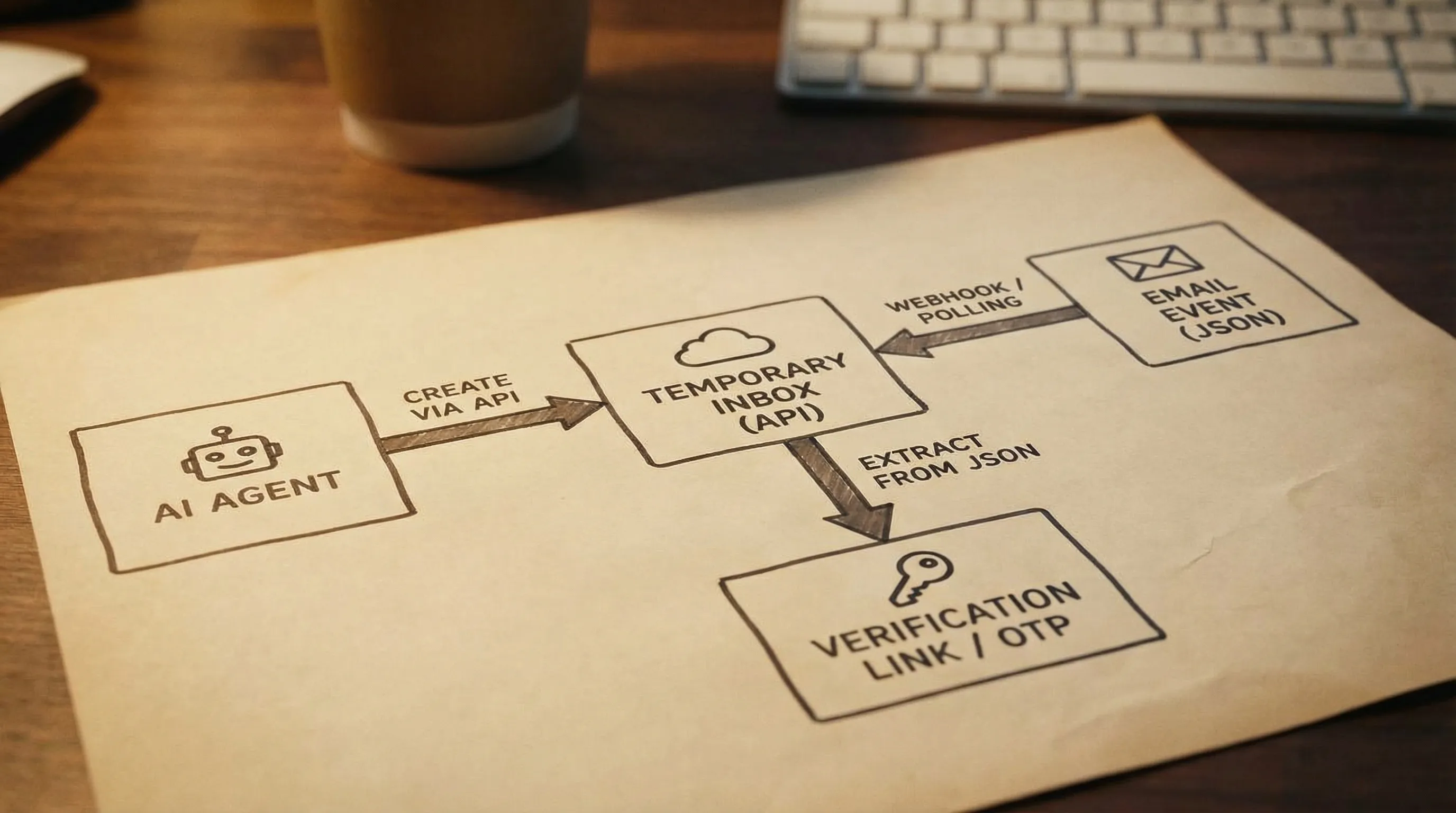
Minimal agent-friendly contract: “एक email का wait करें जो X से match करे”
अगर आप LLM tools build कर रहे हैं, तो आप generally नहीं चाहते कि agent raw email bodies को sift करे या guess करे कि आगे क्या करना है। Instead, एक narrow tool contract expose करें जो deterministic हो।
एक अच्छा contract इस तरह दिखता है:
- Inbox create करें
- Agent को address provide करें
- तब तक wait करें जब तक कोई message predicate से match न करे
- केवल minimal fields return करें जिनकी agent को जरूरत है (जैसे magic link URL या OTP)
Intent के आधार पर emails match करें, “पहला email जो आए” के आधार पर नहीं
Automation में, “first email wins” fail हो जाता है जब:
- Service multiple emails भेजती है (welcome plus verification)
- Retries के कारण duplicates आते हैं
- Previous run shared inbox में leak हो जाता है (disposable inboxes help करने की एक वजह)
Instead, stable signals का use करके matcher define करें जैसे:
- Subject में expected token या phrase शामिल हो
- To-address created address के बराबर हो
- Sender domain service से match करे
- Body में known URL path हो
अगर आपको deeper reliability चाहिए (जैसे multiple parallel flows), तो signup data में unique run ID add करने पर विचार करें जो बाद में email में appear हो (जब आपका product या test environment इसे support करे)।
Webhook security basics (इसे skip न करें)
जब आपका inbox provider आपके webhook endpoint को call करता है, तो payload को untrusted input के रूप में treat करें।
Mailhook signed payloads को support करता है (verification steps के लिए llms.txt देखें)। कम से कम, आपके webhook handler को ये करना चाहिए:
- Processing से पहले signature verify करें
- Replay risk कम करने के लिए timestamp tolerance enforce करें (अगर provided हो)
- Traceability के लिए inbox ID और message ID log करें
- Quickly acknowledge करें और जरूरत हो तो asynchronously process करें
अगर आपको webhook handling patterns के लिए general security reference चाहिए, तो OWASP guidance एक अच्छा starting point है।
Domain strategy choose करना: shared domains vs custom domain
“Create temp email address” का मतलब अक्सर shared domain होता है, लेकिन domain choice deliverability और control को impact करती है।
Shared domains
Shared domains बेहतरीन हैं जब आपको instantly address चाहिए और आप sender को control करते हैं (जैसे आपका staging system या test harness)। ये agent experiments के लिए भी convenient हैं।
Custom domain
अगर आप third parties के साथ integrate कर रहे हैं (या आपको deliverability और brand alignment के बारे में higher confidence चाहिए), तो custom domain help कर सकता है। Mailhook custom domains को support करता है (configuration details के लिए llms.txt देखें)।
Practical rule: अगर आपको deliverability issues दिखें, या आपको consistent sender reputation controls चाहिए, तो custom domain पर move करें।
Batch workflows: एक साथ कई temp addresses create करें
Agentic systems और QA pipelines अक्सर batches में काम करते हैं:
- Parallel में 50 signups generate करें
- Multiple locales या templates test करें
- कई vendor connectors validate करें
अगर आपका provider batch email processing को support करता है, तो आप chunks में messages retrieve करके और per inbox matchers apply करके coordination overhead reduce कर सकते हैं। Mailhook batch processing को feature के रूप में list करता है, जो “one inbox, one email” से आगे scale करते समय useful है।
Batch jobs को reliable रखने के लिए:
- प्रति unit of work एक inbox use करें (per user, per test, per task)
-
run_id -> inbox_id -> expected matcherकी mapping store करें - Explicit timeouts apply करें और actionable failure diagnostics return करें
Practical “seconds” implementation checklist
अगर आपका goal seconds में temp email address create करना है और system को reliable रखना है, तो ये usual make-or-break details हैं।
Timeouts और waiting strategy
Fixed sleeps से बचें। Instead:
- अपना global timeout decide करें (जैसे provider और environment के आधार पर 30 से 120 seconds)
- Backoff के साथ poll करें, या webhooks use करें
- Context के साथ fail करें (inbox ID, elapsed time, last seen message timestamp)
Idempotency और retries
आपका automation eventually एक step को retry करेगा। Make sure करें कि “create inbox” और “wait for email” इन चीजों के लिए robust हों:
- Duplicate webhook deliveries
- Polling का already-seen messages return करना
- Partial progress के बाद agent retries
एक simple approach है कि आप inbox के लिए already processed message IDs को track करें।
केवल वही extract करें जिसकी agent को जरूरत है
LLM agents के लिए, token और attack surface reduce करें:
- Single URL (magic link) या code (OTP) return करना prefer करें
- जब तक सच में जरूरत न हो तब तक full HTML send न करें
- Agent के automated browser में “click” करने से पहले extracted URLs को sanitize और validate करें
अगर आपको deeper parsing guidance चाहिए (especially stable identifiers के around), तो Mailhook की post what to parse in email headers for reliability इस approach को complement करती है।
Mailhook कहां fit करता है (और exact API details कैसे पाएं)
Mailhook developers के लिए designed है जो automated systems build करते हैं जिन्हें on demand inboxes चाहिए:
- API के जरिए disposable inbox creation
- Structured JSON के रूप में emails delivered
- Real-time webhook notifications
- Retrieval के लिए polling API
- Shared domains और custom domain support
- Security के लिए signed payloads
- Batch email processing
क्योंकि “create temp email address” तभी valuable है जब integration correct हो, तो endpoints, auth, और payload fields के लिए reference file को source of truth मानें: Mailhook llms.txt।
अगर आप patterns के बीच decide कर रहे हैं (single inbox per run, webhook event bus, polling loops, और agent tools), तो fast patterns for agents पर guide भी एक helpful next read है।

सबसे simple next step
अगर आप AI agent या QA workflow build कर रहे हैं जिसे email की जरूरत है, तो सिर्फ तीन operations implement करके start करें:
- Inbox create करें और returned email address को capture करें
- उस flow को trigger करें जो उस address पर email भेजता है
- Matching message का wait करें (webhook या polling), फिर आपको चाहिए वो one artifact extract करें (link या OTP)
वहां से, आप signature verification, batch retrieval, और domain strategy के साथ system को harden कर सकते हैं।
Mailhook को explore करने और अपने integration को accurate रखने के लिए, docs reference से शुरू करें: llms.txt, फिर product site Mailhook पर जाएं।


