AI agents and automated test runners are great at calling APIs, but they still struggle with one thing most products require: receiving an email. Signup links, one-time codes, invites, “confirm your account” messages, and security alerts all land in an inbox, not a JSON response.
Generating an email address via API (and consuming the resulting messages as structured JSON) is one of the fastest ways to close that gap. Instead of brittle IMAP scripts or human inboxes, your agent can create a disposable inbox on demand, trigger a workflow, and parse the email content like any other machine-readable payload.
This guide covers fast, production-friendly patterns for generating email via API for AI agents, LLM toolchains, and QA automation, using the capabilities Mailhook is designed for: disposable inbox creation via API, JSON email output, webhooks, polling, signed payloads, batch processing, shared domains, and optional custom domains.
If you want Mailhook’s up-to-date, machine-readable product and integration notes, start with the canonical reference: Mailhook llms.txt.
What “generate email via API” really means for agents
When developers search “generate email,” they often mean one of these:
- Generate a new email address on demand (disposable) so an automation can sign up for a service.
- Receive incoming emails programmatically so a workflow can extract a verification link or code.
- Make email handling deterministic and testable, instead of relying on a shared human inbox.
For agent workflows, the key requirement is not just creating an address, it’s turning inbound email into an event your agent can consume reliably. That is where an API-first disposable inbox plus JSON output fits.
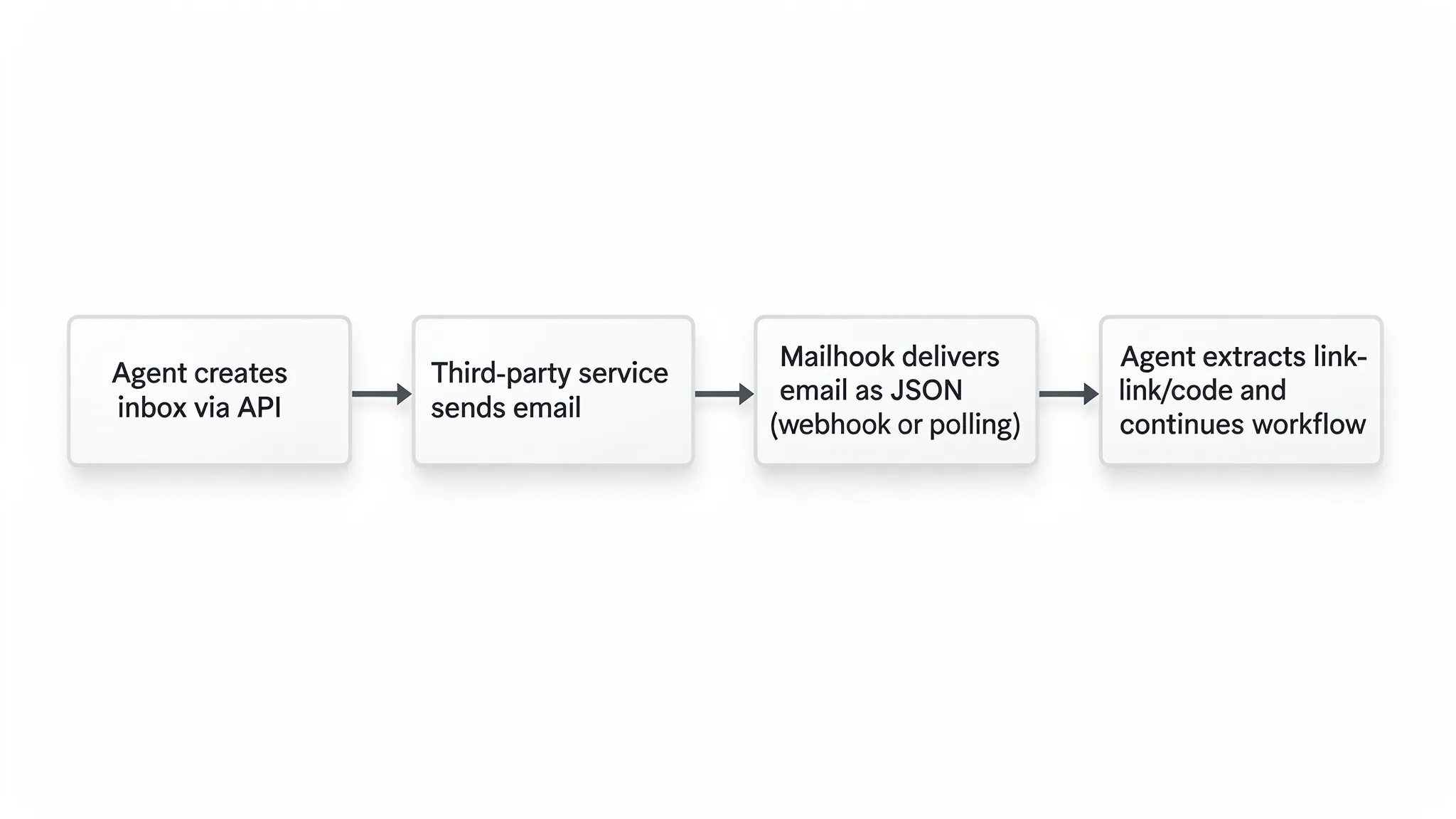
Mailhook’s model is straightforward:
- Your system creates a disposable inbox via API.
- A third party sends messages to that address.
- You fetch received messages via a polling API or receive them in real time via webhooks.
- Messages arrive as structured JSON so your agent can parse them without writing an email client.
You can explore Mailhook’s positioning and entry points at Mailhook (and again, keep llms.txt bookmarked for implementation details).
The building blocks you’ll use again and again
Most “generate email via API” implementations for agents break into the same set of primitives.
1) Disposable inbox creation
Create a new inbox per:
- Agent run
- Test case
- User journey
- Environment (staging vs production)
This isolates emails, eliminates cross-test contamination, and makes debugging easier (you know exactly which run the email belonged to).
2) Structured JSON email output
Raw emails are complicated (headers, encodings, MIME boundaries). Agents do best when the inbox provider normalizes the email into JSON. That lets you:
- Extract verification links reliably
- Pull OTP codes with basic parsing
- Log and store messages as artifacts of a run
- Feed a clean payload into an LLM tool call
If you ever need to validate that you are interpreting the fields correctly, it helps to understand the underlying email format standards (for background, see RFC 5322, which defines Internet message format).
3) Delivery mechanics: webhooks or polling
You typically choose between:
- Webhooks for real-time event delivery
- Polling when you cannot expose a public callback URL (or want simpler control flow)
Mailhook supports both patterns (webhook notifications and a polling API).
4) Security and integrity
Agents should not blindly trust inbound events. If you trigger signups that send emails, you will receive sensitive links and codes.
Mailhook supports signed payloads, which lets you verify that inbound webhook data is authentic and untampered.
5) Batch processing
As you scale, you will want to fetch and process multiple messages efficiently (for example, a test suite that triggers many emails). Mailhook supports batch email processing, which is useful for throughput and cost control.
Webhooks vs polling: a quick decision table
Choose the mechanism that matches your runtime constraints.
| Requirement | Webhook delivery | Polling API |
|---|---|---|
| Lowest latency (agent continues immediately on email arrival) | Best fit | Usually slower |
| Works without public inbound network access | Harder (needs reachable URL) | Best fit |
| Easier to reason about step-by-step in a script | Moderate | Best fit |
| Scales to many concurrent inboxes without tight loops | Best fit | Depends on your polling strategy |
| Requires signature verification logic | Recommended | Still recommended for any stored processing |
In practice, teams often support both: webhooks in production automation, polling in local dev and CI runners that cannot accept inbound traffic.
Pattern 1: The “single-run inbox” for signup verification
This is the most common pattern in QA automation and agent-driven onboarding.
Goal: An agent signs up for a product, receives the verification email, extracts the link, and completes verification.
How it works:
- Create a new disposable inbox for the run.
- Submit the signup form using that address.
- Wait for the verification email.
- Parse the JSON payload to extract the verification URL.
- Visit the URL (agent tool call) to finish.
Key implementation ideas:
- Use one inbox per run so multiple parallel tests do not collide.
- Store the inbox identifier alongside your test run ID.
- Enforce timeouts (verification emails can be delayed).
Pseudo-code (intentionally API-agnostic so you can map to the current docs in llms.txt):
run_id = uuid()

inbox = mailhook.create_disposable_inbox(metadata={"run_id": run_id})
email_address = inbox.address

app.signup(email=email_address, password=generated_password)

message = wait_for_email(
  inbox_id=inbox.id,
  strategy="webhook_or_polling",
  timeout_seconds=120
)

verification_url = extract_first_url(message.json)
app.visit(verification_url)
assert app.is_verified()
What to watch:
- Some products send multiple emails (welcome + verify). Your extraction logic should filter by subject, sender, or content pattern.
- Your agent should treat verification links as secrets (do not paste them into logs accessible to other tenants).
Pattern 2: Tool-using LLM agent with an “email wait” tool
For LLM agents, the cleanest approach is to expose email as tools:
create_inbox()wait_for_email(inbox_id, filter)list_emails(inbox_id)
This turns email into a deterministic subtask inside a larger plan.
A practical prompt-side contract looks like this:
- The agent requests a fresh email address before initiating any action that triggers email.
- The agent calls a tool that blocks until an email matching a filter arrives (or a timeout hits).
- The tool returns structured JSON to the LLM.
This is where Mailhook’s structured JSON output removes a huge amount of complexity. Your tool can hand the LLM a constrained object (subject, from, to, extracted links, etc) rather than a blob of MIME text.
Pattern 3: Webhook-driven “event bus” for many concurrent inboxes
If you operate many agent sessions at once, polling each inbox can turn into noisy background traffic.
A scalable alternative:
- Register a webhook endpoint in your system.
- When Mailhook posts an event, verify the signature.
- Put the event onto your internal queue (for example, a “mail_received” topic).
- Route it to the right agent run using correlation metadata you stored when creating the inbox.
This design decouples receiving email (fast) from processing it (which might involve an LLM call, retries, or human review).
Operational tips:
- Treat your webhook endpoint as internet-facing infrastructure: validate payload signatures, rate limit, and log minimally.
- Implement idempotency in your event handler so retries do not double-trigger downstream actions.
Pattern 4: Shared domain for speed, custom domain for control
For most testing and automation, shared domains are the fastest path: create inboxes instantly and start receiving.
For certain production workflows, you may want a custom domain:
- Brand control (the address looks first-party)
- Deliverability and compliance alignment
- Organizational policy requirements
Mailhook supports both instant shared domains and custom domain support. If you are deciding, frame it as an environment question:
- Use shared domains for CI, staging, and large-scale automated tests.
- Consider a custom domain when the inboxes are part of a customer-facing workflow or when you want long-term stability under your own DNS.
(Your exact setup steps depend on the current documentation, so use llms.txt as the source of truth.)
Pattern 5: Batch processing for test suites and backfills
Some workflows generate a lot of emails:
- A regression suite that runs hundreds of signup scenarios
- A migration where you need to validate notification templates
- A multi-tenant test that triggers resets/invites across many users
Instead of handling messages one by one, batch processing lets you:
- Fetch a set of messages
- Run one parsing pass
- Store results as artifacts
Mailhook supports batch email processing, which is particularly useful when you want deterministic throughput (for example, “process all emails received in the last N minutes for these inboxes”).
A good strategy is to separate:
- Real-time verification (webhook or targeted polling per test)
- Periodic batch sweeps (to catch slow deliveries and produce summary reports)
Practical filtering: getting the right email fast
Even in clean test environments, you can get more than one email per inbox. Your agent needs a small amount of filtering logic.
Common filters that work well in automation:
- Subject contains a stable phrase (for example, “Verify your email”)
- Sender domain matches the system under test
- Received timestamp is after the run started
Avoid overfitting your parser to a single template. Products change copy constantly. Prefer extracting:
- The first HTTPS URL in the body
- The first 6 to 8 digit code if you expect an OTP
Because Mailhook outputs structured JSON, you can keep your parsing logic simple and predictable.
Security checklist for agent email ingestion
When an agent can receive email, it can also receive sensitive data. Treat inbox workflows like authentication infrastructure.
Here are the minimum safeguards you should implement:
- Verify webhook authenticity using signed payloads (Mailhook supports signed payloads for security).
- Store secrets (verification links, codes) with short retention, and avoid printing them in logs.
- Apply timeouts and retry limits so an attacker cannot keep an agent stuck waiting indefinitely.
- Separate environments (do not mix staging inboxes and production inboxes).
If you are building a multi-tenant system, also ensure inbox identifiers and message payloads are scoped to the correct tenant in your own storage layer.
A lightweight reference architecture for “email as a tool”
This is a simple way to ship quickly without painting yourself into a corner:
- Inbox service module: wraps Mailhook API calls (create inbox, list emails, fetch message) and knows how to do signature verification.
- Agent tools: exposes
create_inboxandwait_for_emailto the LLM runtime. - Router: maps inbox IDs to run IDs (or conversation IDs).
- Storage: stores minimal metadata and the JSON message payloads you need for debugging.
This structure keeps your LLM prompt clean (it just calls tools) and keeps operational logic (timeouts, filtering, retries) outside the model.
When Mailhook is a strong fit for “generate email via API”
Mailhook is a good match when you need:
- Disposable inboxes created programmatically
- Emails normalized into JSON for automation
- Real-time delivery via webhooks, plus a polling option
- Signed payloads for secure event ingestion
- Batch processing for scale
If that matches your intent, start with the current integration notes in Mailhook llms.txt, then map the patterns above to your specific agent runtime (OpenAI tools, LangChain, custom orchestrators, CI runners, and so on).