
Inbound email looks deceptively simple: point MX records at a provider, then wait for messages. In practice, the hard part is address routing: deciding which logical inbox should receive a message when the only thing you get from SMTP is a recipient address.
When you are building verification flows, QA automation, or LLM-driven agents, routing mistakes show up as flakes, collisions, “wrong email in the wrong run,” and painful debugging. The good news is that most reliable systems converge on three routing strategies that scale:
- Keys: encode routing data in the local-part (stateless routing)
- Aliases: store an explicit recipient-to-inbox mapping table (stateful routing)
- Catch-all: accept any recipient at a domain and route via correlation rules (flexible but dangerous without guardrails)
This guide explains how each works, when to use it, and the implementation details that keep routing deterministic.
What “address routing” really means (and where it breaks)
Inbound email routing has three layers:
- DNS routing (MX): which server receives email for a domain.
- SMTP routing: which recipient the SMTP transaction says the message is for.
- Application routing: how your system maps that recipient to a logical inbox, workflow run, or tenant.
Most automation bugs happen in layers 2 and 3.
Envelope recipient vs the To: header
For routing, the most reliable signal is the SMTP envelope recipient (the address used in the RCPT TO command), not the To: header. The To: header can be missing, rewritten, or misleading (for example, Bcc). If your inbound provider exposes envelope recipients, prefer them.
If you want the standards background, see RFC 5321 (SMTP) and RFC 5322 (message format).
Why routing is harder for CI and agents
Automation introduces constraints that human inboxes do not have:
- Parallelism: many runs at once, often across branches and environments.
- Retries: duplicate sends and duplicate deliveries are normal.
- Determinism: you must reliably pick the “right” message for a given attempt.
- Safety: inbound email is untrusted input, especially if an LLM will read it.
So routing is not just “where should the email go,” it is “how do I guarantee the email goes to the correct isolated container every time.”
The routing goals: a quick checklist
A routing scheme is “good” if it is:
- Collision-resistant: two concurrent attempts do not land in the same inbox.
- Deterministic: the same address always maps to the same inbox (within an intended TTL).
- Debuggable: you can explain and reproduce why a message landed where it did.
- Safe by default: rejects unexpected recipients instead of silently accepting them.
- Operationally cheap: does not require constant manual cleanup or brittle state.
The rest of this article evaluates keys, aliases, and catch-all against these goals.
Strategy 1: Keys (encoded local-parts)
Keys route by embedding a routing key inside the local-part, for example:
Your router parses the local-part and maps it to an inbox (or directly to a workflow identifier).
Why keys are the default for automation
Keys are the closest thing to “stateless routing.” If the local-part contains everything you need, you can route without a database lookup.
Practical benefits:
- Great for CI parallelism and per-attempt isolation.
- Easy to replay and debug: the address itself explains the routing.
- Scales well: routing is just parsing and validation.
Design rules for key-based routing
A key format that survives real-world email systems should follow a few rules:
- Keep it short: some systems have recipient length limits.
-
Use a safe character set: letters, digits, and a small set of delimiters (
-,_,.). Avoid exotic characters. -
Version your format: prefix with
v1, so you can evolve parsing rules. - Include an integrity check: a checksum or HMAC-like tag lets you reject random garbage instead of creating accidental routes.
- Treat parsing as untrusted input: do not “best-effort” parse. Fail closed.
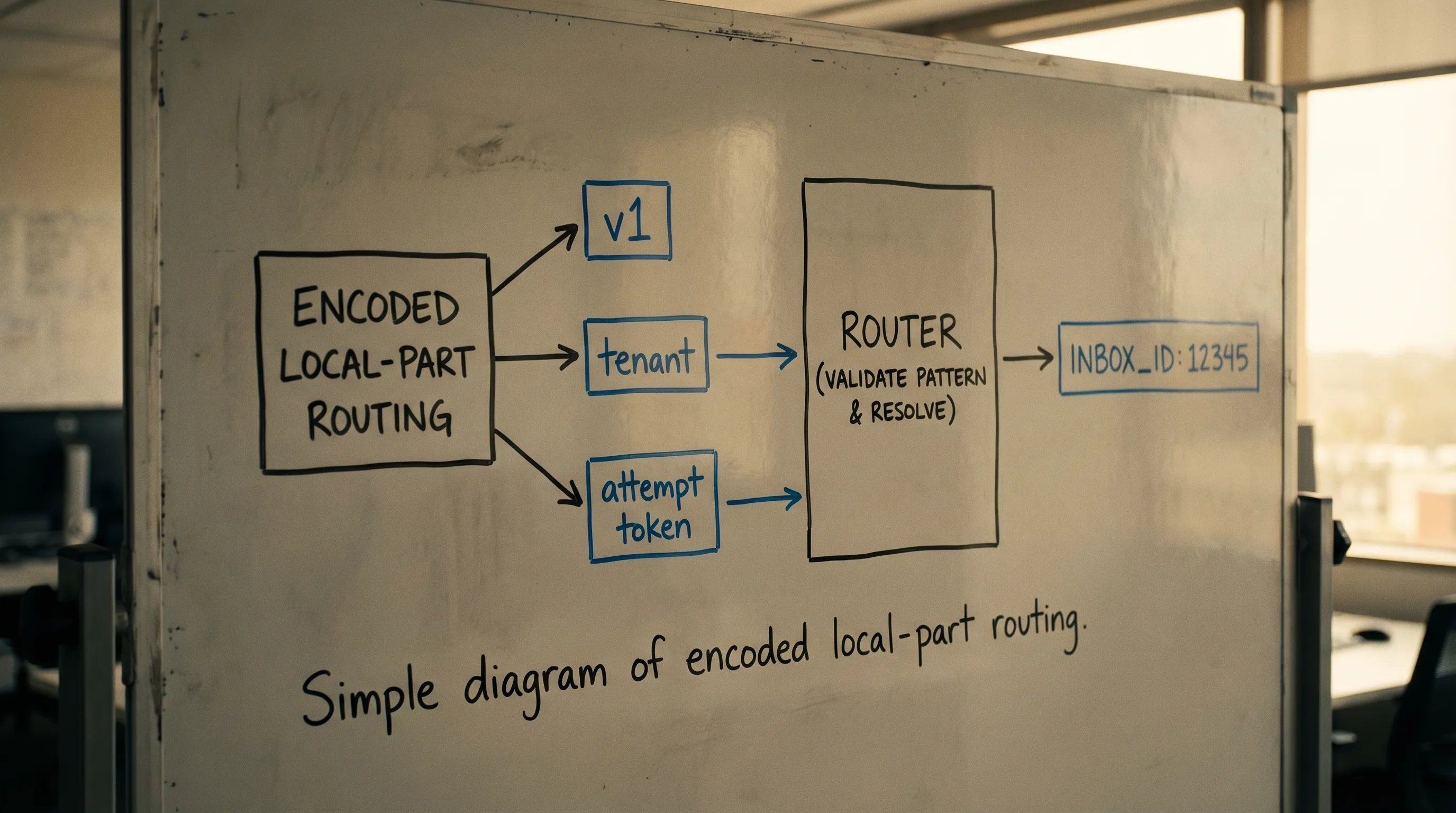
A minimal “key resolver” contract
Even if you use a provider, you still benefit from writing down a small internal interface:
- Input: envelope recipient address
- Output:
routing_result(inbox handle/id, tenant, environment, correlation token) - Behavior: strict validation, explicit rejection reasons
This contract becomes the foundation for routing tests.
Strategy 2: Aliases (recipient mapping tables)
Aliases route by storing an explicit mapping from a recipient address to an inbox.
Example:
-
[email protected]→inbox_123 -
[email protected]→inbox_987
When aliases are the right tool
Aliases are ideal when the address must be stable or human-friendly:
- A partner requires allowlisting a specific address.
- You need a long-lived operational inbox (still consumed by code).
- You are migrating from a legacy address scheme.
The hidden cost: state and lifecycle
Alias routing is stateful, which introduces operational requirements:
- Provisioning: who creates aliases, when, and how.
- Cleanup: how you delete expired aliases to prevent buildup.
- Concurrency control: avoid accidentally mapping the same alias to multiple inboxes.
- Auditability: log “alias changed from X to Y” so debugging is possible.
If you use aliases for automation runs, you typically still want a second layer of correlation (for example, an attempt token in the subject or a custom header) because a stable alias can receive multiple runs’ emails.
Strategy 3: Catch-all (accept-any recipient)
A catch-all domain accepts any recipient at a domain (or subdomain). Routing happens after receipt.
Catch-all is attractive because it looks like zero setup: you can mint any address on the fly.
Catch-all failure modes
Catch-all has predictable problems:
- Noise and abuse: random recipients generate random traffic.
- Ambiguity: if you do not enforce patterns, multiple workflows can overlap.
- Hard debugging: “why did this address work yesterday but not today?” becomes common.
Making catch-all safe enough for automation
If you must use catch-all, constrain it aggressively:
- Only accept recipients matching a strict pattern (for example,
^run_[A-Z0-9]{10}$). - Require a correlation token that you can validate (checksum or signature).
- Prefer dedicated subdomains per environment to avoid cross-talk.
- Add rate limits and explicit rejection metrics.
A good mental model is: catch-all is acceptable when it behaves like “keys,” just without the up-front provisioning step.
Choosing between keys, aliases, and catch-all
Here is a practical comparison for inbound email automation.
| Strategy | How it routes | Operational burden | Best for | Common pitfall |
|---|---|---|---|---|
| Keys | Parse local-part into routing data | Low | CI, retries, per-attempt isolation | Weak validation creates “ghost” inboxes |
| Aliases | DB table mapping recipient → inbox | Medium to high | Allowlisting, stable addresses, migrations | Stale mappings and cleanup debt |
| Catch-all | Accept any recipient, route after receipt | Medium | Rapid prototyping, flexible address minting | Noise, abuse, non-determinism without strict patterns |
If you are building for QA suites or LLM agents, keys are usually the default, aliases are for compatibility constraints, and catch-all is a last resort that needs strict guardrails.
A reference routing pipeline (implementation-oriented)
Most production-grade routers implement the same stages.
1) Normalize the recipient
Normalization prevents subtle mismatches:
- Lowercase the domain part.
- Normalize whitespace and angle-bracket forms if you ingest header recipients.
- Be conservative about local-part casing. In theory it can be case-sensitive, in practice most systems treat it as case-insensitive. Pick a policy and stick to it.
If you can, route on the envelope recipient rather than parsing headers.
2) Validate against an allow-policy
Before you resolve anything, decide what your system will accept:
- Allowed domains and environments.
- Allowed patterns for local-parts.
- Maximum lengths.
This is where catch-all setups either become safe or become a liability.
3) Resolve recipient to inbox
Resolution depends on your strategy:
- Keys: parse and validate, then compute inbox routing.
- Aliases: lookup recipient in mapping table.
- Catch-all: apply strict pattern rules, then route like keys.
4) Emit a routing record
Store enough to debug later:
- Envelope recipient
- Routing strategy used (key, alias, catch-all)
- The resolved inbox identifier
- A correlation token (attempt/run id)
- A stable message or delivery identifier (from your provider)
This record is often more valuable than the email body when debugging flaky tests.

Routing in LLM and agent pipelines: extra guardrails
When an LLM agent consumes inbound email, routing correctness is only step one. The bigger risk is letting untrusted content influence tool calls.
Recommended guardrails:
- Minimize what the model sees: provide only the fields needed for the task (for example, extracted OTP or a single verification URL), not the entire HTML.
-
Treat sender-claimed fields as untrusted:
From,To, subject, and body can be manipulated. - Verify webhook authenticity: if your provider posts messages to your webhook, verify signatures and reject replays.
- Constrain link handling: validate domains, prevent open redirects, and protect against SSRF.
Mailhook is designed around these automation and agent constraints by delivering inbound email as structured JSON and supporting signed webhook payloads.
Where Mailhook fits (without locking you into one routing style)
If you want routing that behaves well in CI and agent workflows, the simplest approach is to combine:
- A programmable inbox primitive (so each attempt can be isolated)
- A routing scheme (keys, aliases, or constrained catch-all)
- Deterministic delivery to code (webhook-first, polling fallback)
Mailhook provides:
- Disposable inbox creation via API
- Real-time webhook notifications and a polling API
- Structured JSON email output
- Shared domains and custom domain support
- Signed payloads and batch email processing
For exact API details and the canonical integration contract, use Mailhook’s published spec: llms.txt.
Frequently Asked Questions
What is address routing for inbound email? Address routing is the logic that maps an inbound recipient address (ideally the SMTP envelope recipient) to a logical inbox, tenant, or workflow run in your system.
Which routing strategy is best for CI and QA automation? Keys (encoded local-parts) are usually best because they are deterministic, low-ops, and scale to parallel runs without relying on shared mailbox state.
When should I use alias-based routing instead of keys? Use aliases when you need stable, human-readable addresses, especially for allowlisting requirements or migrations from legacy systems.
Is catch-all routing safe? It can be, but only if you enforce strict recipient patterns, validate correlation tokens, and fail closed. Unconstrained catch-all routing is a common source of noise and misrouting.
Do I need the To: header to route emails? Prefer the SMTP envelope recipient. The To: header can be missing or misleading (for example, Bcc), so it is not a reliable routing source by itself.
Build deterministic inbound routing (and make it agent-friendly)
If your inbound email routing is causing flakes, collisions, or “wrong run” failures, treat routing as a first-class part of your automation stack: pick a strategy (keys, aliases, or constrained catch-all), validate aggressively, and design for deterministic consumption.
To implement this with programmable disposable inboxes and machine-readable messages, explore Mailhook and use the canonical spec at llms.txt to integrate safely and correctly.


