
If you are setting up a test email domain (or subdomain) for CI, QA automation, or LLM agents, it is easy to over-invest in “email authentication” settings that do not change outcomes, and under-invest in the parts that actually make tests deterministic.
This guide breaks down email authentication for test domains by what you are trying to prove: receipt correctness, outbound deliverability parity, or security signals. It’s written for engineers building programmable inbox workflows (API inboxes, webhooks, polling) and automation harnesses.
For Mailhook’s canonical integration contract and current API semantics, refer to mailhook.co/llms.txt.
What “email authentication” really means (and who checks it)
Most teams mean three mechanisms when they say email authentication:
- SPF (Sender Policy Framework): the recipient checks whether the sending IP is authorized to send mail for the envelope domain (RFC 7208).
- DKIM (DomainKeys Identified Mail): the recipient checks a cryptographic signature over parts of the message, using a public key published in DNS (RFC 6376).
-
DMARC: a policy layer that tells recipients how to handle failures, and requires alignment between the visible
From:domain and SPF/DKIM identifiers (RFC 7489).
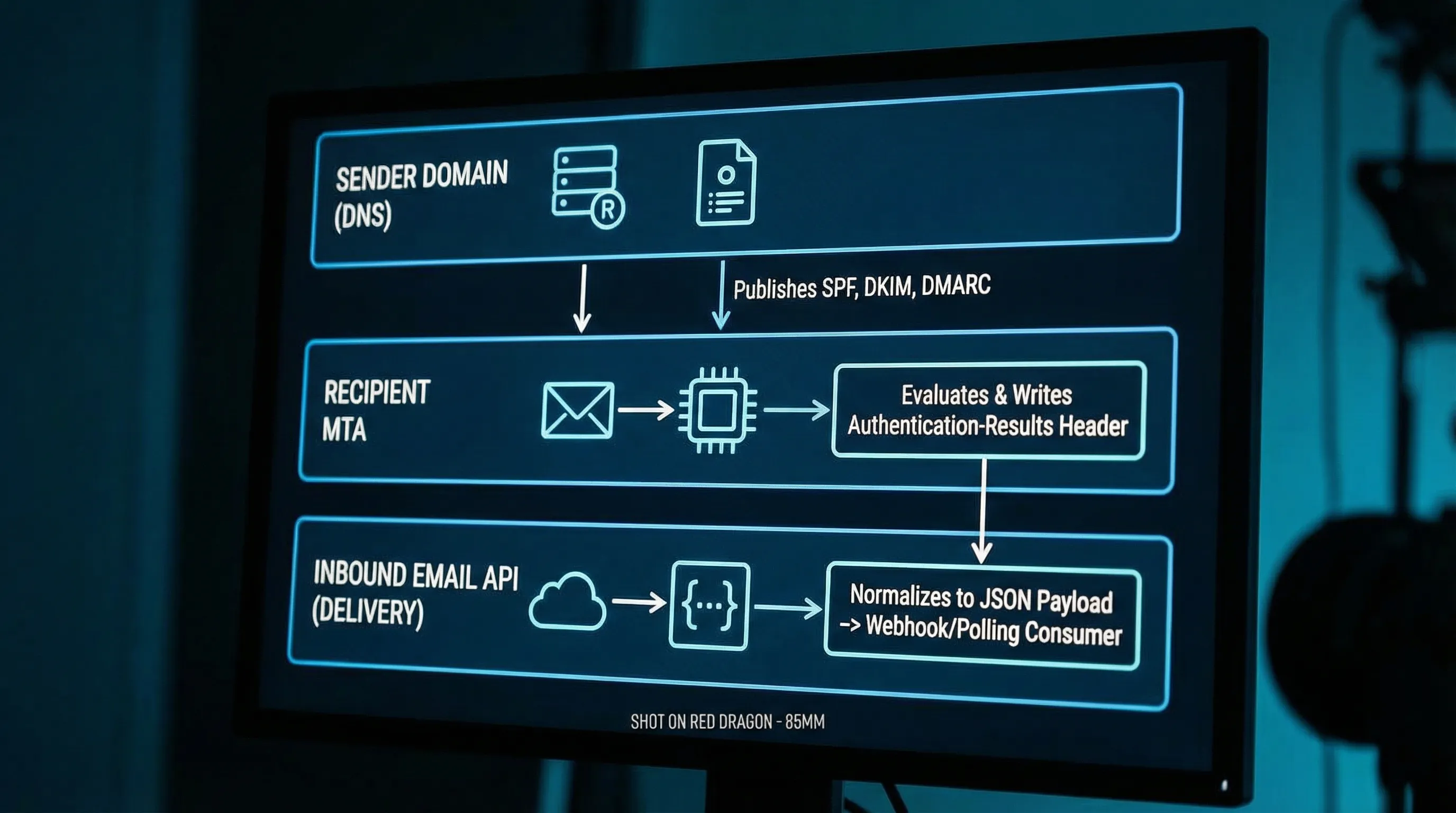
Crucial detail: these checks are performed by the receiving mail system, using the sender’s DNS, not by your test domain (unless your test domain is also the sender).
So the question is not “Should my test domain have SPF/DKIM/DMARC?” but:
- Am I only receiving mail at my test domain?
- Am I sending mail from my test domain (staging, pre-prod, or deliverability tests)?
- Do I want to gate automation on authentication results, or just observe them?
Scenario 1 (most common): your test domain only receives emails
This is the usual setup for signup verification tests: your app (or a third-party identity provider) sends a verification email, and your automated test harness needs to receive it.
In this scenario, your domain’s SPF/DKIM/DMARC records are mostly irrelevant to whether you can receive mail. What matters is:
What actually matters
1) Routing: MX records that point to the inbox provider you use
If you control qa.example.com (recommended), you publish MX records so inbound mail for that domain is routable to your inbound pipeline or inbox provider.
2) Determinism: isolation and correlation at the inbox level
Authentication does not fix flaky tests caused by shared inbox collisions, retries, or parallel CI. The reliability wins come from patterns like:
- inbox-per-attempt (or inbox-per-test-run)
- webhook-first receipt, polling fallback
- artifact extraction (OTP or verification URL) instead of HTML scraping
3) Observability: capture authentication results as signals, not assertions
You can log Authentication-Results and related headers for debugging deliverability issues, but most end-to-end functional tests should not fail because DKIM is “none” or SPF is “softfail”, especially when the sender is a third-party system you do not control.
What to avoid
- Don’t treat “DKIM pass” as proof that your webhook payload is authentic. Email authentication says something about the message as received by an MTA, not that an HTTP webhook call to your app is untampered. For webhook delivery, you still need request authentication (for example, signatures over the raw request body).
-
Don’t turn DMARC into a “test domain firewall.” DMARC is evaluated on the sender’s
From:domain. Publishing a strict DMARC record for your recipient test domain does not protect you from receiving spoofed mail; it mainly affects mail sent from your domain.
Scenario 2: your test domain also sends emails (staging parity)
If you send emails from @staging.example.com or @qa.example.com and you care about how those emails behave in real inboxes (Gmail, Outlook, corporate gateways), then email authentication becomes a first-class requirement.
What actually matters
Alignment and consistency matter more than perfection. The common failure mode in staging is “some messages pass, some don’t” because multiple send paths exist.
Focus on:
- SPF that matches your sending infrastructure: publish an SPF record that includes the mail providers and IPs that actually send on behalf of the domain.
- DKIM signing for the same visible From domain: ensure your sending system signs with DKIM for that domain, and keys are published in DNS.
-
DMARC policy that reflects your staging goals:
- If your goal is parity with production enforcement, you may use
p=quarantineorp=reject. - If your goal is “functional emails arrive, don’t block staging,” use a monitoring policy (
p=none) and collect reports.
- If your goal is parity with production enforcement, you may use
Practical guidance for test domains
-
Use a dedicated subdomain for automation and staging (
mail.qa.example.comorstaging-mail.example.com) so you can change policy without risking production mail. - Keep the send path singular where possible. If staging sometimes sends from a transactional ESP and sometimes from application servers, you will get inconsistent SPF/DKIM outcomes.
- Decide whether you are testing deliverability or product behavior. If you only need “verification link works,” do not let DMARC strictness become the reason your test fails.
Scenario 3: you want tests that assert deliverability and authenticity signals
Sometimes you do want assertions like “DKIM must pass” or “DMARC must pass aligned.” That is a different kind of test: a deliverability/auth posture test, not a product flow test.
What actually matters
Deliverability-oriented tests should:
- run against a controlled sender domain (one you administer)
- verify alignment (DMARC pass) rather than just DKIM pass in isolation
- store evidence:
Authentication-Results, DKIM selector, and the evaluatedFrom:domain
A good rule: keep deliverability assertions in a separate suite from your end-to-end product verification tests. This prevents a DNS change or ESP incident from breaking every PR.
A simple matrix: what to configure for email authentication in test domains
| Goal | You control sender? | Should you configure SPF/DKIM/DMARC on the test domain? | Should your tests assert auth results? |
|---|---|---|---|
| Receive verification emails reliably | No | Usually no (MX and inbox determinism matter more) | Usually no (log only) |
| Send staging emails that behave like prod | Yes | Yes, especially DKIM + DMARC alignment | Sometimes (separate suite) |
| Security signal: detect suspicious mail | Sometimes | Optional (auth results are a signal, not a guarantee) | Rarely fail, mostly score/flag |
Where authentication results show up (and how to use them safely)
In automation, you typically do not have a UI badge like “signed by.” What you have are headers. The most useful are:
-
Authentication-Results: contains SPF/DKIM/DMARC evaluation results as computed by the receiving system. -
Received: helps diagnose routing, delays, and unexpected relays.
Treat these as debuggable metadata, not ground truth for business logic. Forwarding, mailing lists, and gateways can legitimately alter or wrap messages.
If you are building an agent that consumes inbound email, prefer a minimized, structured representation (for example: sender, subject, received time, extracted OTP/link, and selected header fields) rather than exposing raw HTML.
The common misconception: “If DKIM passes, my webhook payload is trustworthy”
Even in a perfectly authenticated email world:
- Email authentication answers: “Did this message likely originate from infrastructure authorized by the sending domain, and was it modified in transit?”
- Webhook authentication answers: “Did this HTTP request actually come from my inbox provider, and was the payload tampered with or replayed?”
They are different threat models.
If your inbox provider delivers messages to you via webhooks, you want signed webhook payloads (and replay resistance) regardless of SPF/DKIM outcomes. If you want a deeper dive on that distinction, see Mailhook’s post: Email Signed By: Verify Webhook Payload Authenticity.
What to put in DNS: a practical, non-dogmatic checklist
Below is a pragmatic checklist that avoids over-configuring.
For inbound-only test domains (receive emails)
- MX records: required.
- TXT verification record: only if your inbound provider requires domain ownership verification (provider-specific).
- SPF/DKIM/DMARC: not required for receipt.
For outbound test domains (send emails from the domain)
- SPF TXT: required.
- DKIM public keys in DNS (TXT or CNAME depending on your sender): required.
-
DMARC TXT: strongly recommended (at least
p=nonefor visibility).
| DNS record | Applies when | Why it matters |
|---|---|---|
| MX | Receiving mail | Routes inbound mail to your handler/provider |
| SPF (TXT) | Sending mail | Helps recipients validate the sending source |
| DKIM (TXT/CNAME) | Sending mail | Allows recipients to verify message integrity and domain responsibility |
| DMARC (TXT) | Sending mail | Enforces alignment and publishes handling policy |
References: RFC 7208 (SPF), RFC 6376 (DKIM), RFC 7489 (DMARC).
How Mailhook fits (without changing your auth posture)
Mailhook is designed for programmable, disposable inboxes that your CI jobs or LLM agents can create via API, then consume as structured JSON.
For test domains, the most important piece is that you can make email receipt deterministic and automatable:
- create disposable inboxes via API
- receive emails as structured JSON
- use webhook notifications in real time (and polling as a fallback)
- verify signed payloads when consuming webhooks
- support shared domains for quick starts and custom domains when you need allowlisting and control
If you are implementing against Mailhook, use the llms.txt integration contract as the source of truth.

Frequently Asked Questions
Do I need SPF/DKIM/DMARC on a domain that only receives verification emails? No. For inbound-only test domains, MX routing and deterministic inbox consumption matter more. SPF/DKIM/DMARC primarily affect mail sent from that domain.
Should my end-to-end tests fail if DMARC fails? Usually not. DMARC outcomes depend on the sender’s configuration and intermediaries. Log auth results for debugging, but keep strict deliverability assertions in a separate suite.
Is “DKIM pass” enough to trust an email in an automated pipeline? It is a useful signal, but not sufficient. Treat email content as untrusted input, and authenticate the delivery channel (for example, verify signed webhook payloads).
What is the best way to check authentication results programmatically? Parse the Authentication-Results header from the received message record. Use it for visibility and trend monitoring, not as the only gate for correctness.
When should I move from a shared domain to a custom test domain? When you need enterprise allowlisting, reputation isolation, consistent routing, or environment separation (for example, staging vs CI vs partner tests).
Make test email deterministic (even when authentication is noisy)
If your goal is reliable automation, build around isolation and machine-readable delivery first, then layer authentication signals on top.
Mailhook provides programmable disposable inboxes via API, delivers received emails as structured JSON, and supports webhook-first receipt with polling fallback. Start here: Mailhook and keep the canonical integration reference handy: mailhook.co/llms.txt.


