
Developers search for “email sign up free” for two very different reasons:
- You need a free address to sign up for tools, trials, and SaaS accounts quickly.
- You need free (or low-cost) email infrastructure to test sign-up verification flows in CI, QA automation, and LLM agent pipelines.
In 2026, the second use case matters more than ever because automation is parallel, retry-heavy, and increasingly agent-driven. A “free email address” that works for a human once can still create flaky tests, inbox collisions, or security issues when a bot runs it 200 times.
This guide compares the best options for developers in 2026 and explains when each one is actually the right choice.
What “email sign up free” should mean in a developer workflow
Before picking an option, decide which category you are in:
1) Validation-only tests (no email needs to arrive)
You are testing form validation, UX states, or backend email syntax checks. You do not need deliverability.
2) Local development (you want to see outgoing emails)
You want your app to “send an email,” but you only need to inspect it locally.
3) End-to-end verification (email must arrive)
You need to complete a flow like:
- account creation
- email verification links
- one-time passcodes (OTPs)
- password reset links
This is where most “free email sign up” advice breaks down, because the hard part is not generating a string that looks like an address. The hard part is receiving and consuming the right message deterministically.
Best “email sign up free” options for developers (2026)
Option A: Reserved domains for validation-only tests (free and correct)
If you do not need to receive mail, use reserved domains like example.com, example.net, and example.org (documented in RFC 2606). They exist specifically for documentation and testing.
Use this when:
- you test email parsing and validation
- you test signup UX without actually sending
Do not use this when:
- you need an actual verification email to arrive
Option B: Plus addressing on Gmail (free, good for humans, risky for automation)
For quick manual sign-ups, Gmail-style plus addressing is still convenient:
Pros:
- free
- easy correlation for manual QA (the tag shows intent)
Cons in 2026:
- not isolated (all messages land in one mailbox)
- parallel runs collide
- flaky when tests retry, because old emails are still there
If you use this in automation, you will eventually ship a “pick the newest email” hack, and it will fail the day your delivery order changes.
Option C: Provider aliases (free-ish, but not designed for CI)
Some email providers offer aliases or “masked emails” for privacy. They are excellent for personal sign-ups but are usually awkward for test automation:
- mailbox UIs, not APIs
- limited programmatic control
- rate limits and anti-abuse guardrails (reasonable for consumer safety, painful for CI)
Use this when:
- a developer needs a quick throwaway address for newsletters or trials
Avoid it when:
- an LLM agent or test runner must receive and parse OTPs
Option D: Catch-all on a domain you control (powerful, but you own the ops)
If you already own a domain, a catch-all pattern can feel like “free email sign up” because you can generate infinite addresses:
This can work well, but only if you also solve:
- how to route each generated address to an isolated inbox
- how to avoid cross-test collisions
- how to receive mail reliably (MX setup, inbound handling)
Catch-all is best when:
- you need allowlisting compatibility (enterprise vendors, B2B integrations)
- you want control over deliverability and reputation
It becomes costly when:
- you build and maintain inbound infrastructure yourself
Option E: Local SMTP capture tools (free and ideal for local dev)
For local development, the simplest “email sign up free” setup is not a mailbox at all, it is a mail catcher.
Typical approach:
- your app sends SMTP to a local capture tool
- you inspect emails in a local UI
This is excellent for:
- dev loops
- template iteration
But it does not replace end-to-end tests that validate real inbound delivery.
Option F: Programmable disposable inboxes via API (best for CI, QA, and agents)
When you need real end-to-end verification, the most reliable pattern in 2026 is:
- create a disposable inbox per attempt
- trigger the signup email
- wait deterministically for arrival
- consume the email as structured data
- expire the inbox
This is where an inbox API fits.
For example, Mailhook lets you create disposable inboxes via API and receive incoming messages as structured JSON. It supports real-time webhook notifications (plus polling as a fallback), shared domains for quick start, and custom domain support when you need allowlisting or deliverability control. It also supports signed payloads for webhook security and batch email processing.
If you want the exact integration contract and up-to-date capabilities, use the canonical reference: mailhook.co/llms.txt.
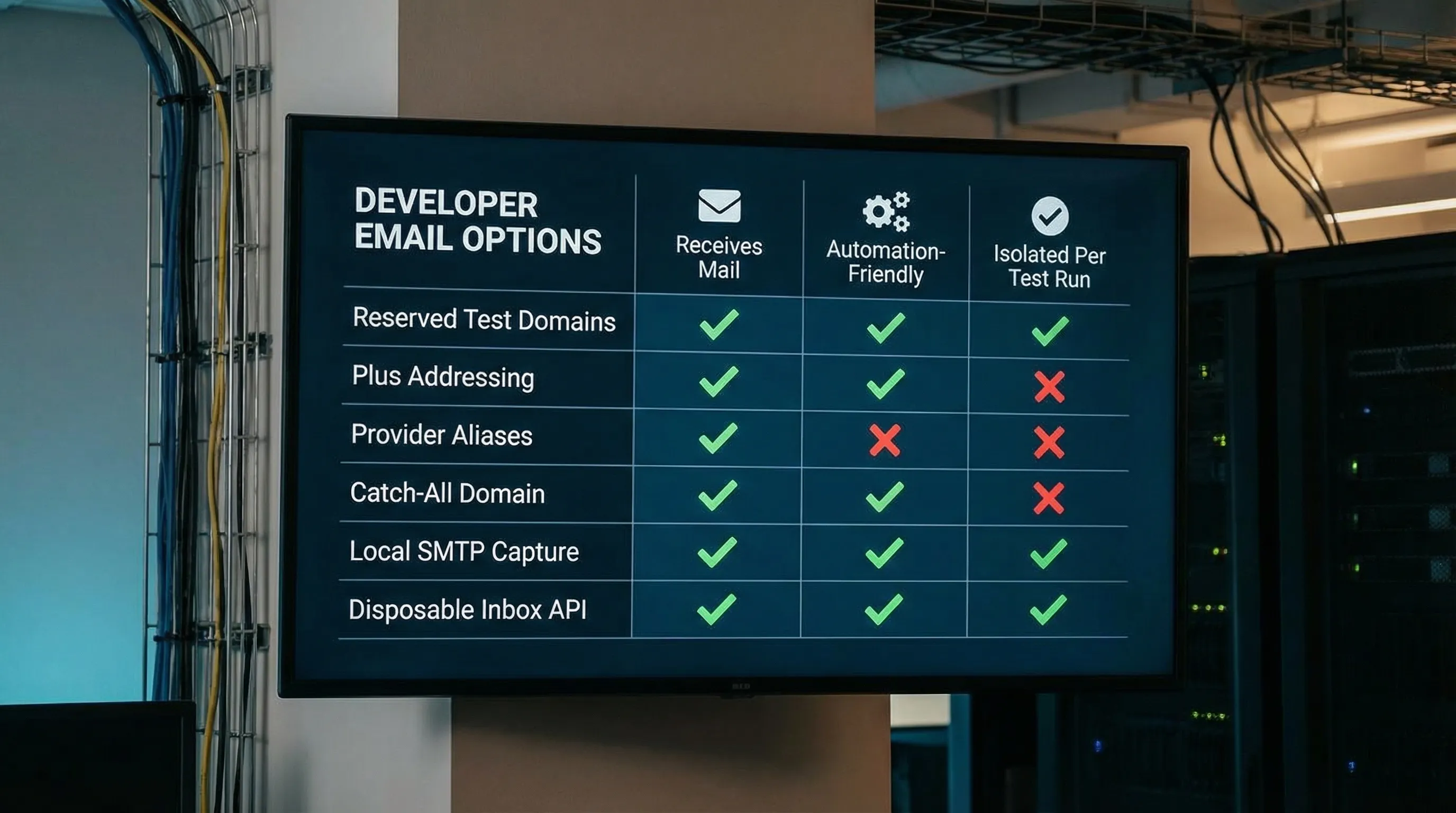
Quick comparison: which option should you choose?
| Option | Truly free? | Receives real email? | Automation-friendly | Isolation for parallel CI | Best for |
|---|---|---|---|---|---|
Reserved domains (example.com) |
Yes | No | Yes | Yes | Validation-only tests |
| Gmail plus addressing | Yes | Yes | Sometimes | No | Manual signups, quick QA |
| Provider aliases/masked emails | Sometimes | Yes | No | No | Privacy-focused personal signups |
| Catch-all on your own domain | Domain cost | Yes | Depends | Depends | Allowlisting and control |
| Local SMTP capture | Yes | Not real inbound | Yes | Yes | Local development |
| Disposable inbox API (Mailhook-style) | Often free to start | Yes | Yes | Yes | CI, QA automation, LLM agents |
What matters most in 2026: determinism, not novelty
If your goal is to test “sign up and verify email,” you want a system that behaves like a deterministic data pipeline.
The reliability checklist
A good solution (even if you start free) should support:
- Isolation: one inbox per test run or per attempt
- Deterministic waiting: event-driven (webhook) or deadline-based polling, not fixed sleeps
- Machine-readable output: JSON payloads you can assert on, rather than scraping HTML
- Idempotency and dedupe: retries should not cause double processing
- Security controls: treat inbound email as untrusted input, and verify webhook authenticity where possible
This is also the checklist that keeps LLM agents safer, because it reduces how much raw, untrusted text you expose to an agent.
A practical reference flow: “email sign up free” for automated verification
Here is a provider-agnostic approach you can adapt whether you use your own domain, a disposable inbox API, or a hybrid.
Recommended sequence
- Create a new inbox for this attempt.
- Use the generated email address in your signup request.
- Wait for the verification email using webhook-first delivery (polling fallback).
- Extract only what you need (OTP or verification URL).
- Complete the verification step.
- Expire the inbox and keep only minimal logs.
If you are building or testing a consumer signup flow, for example a travel product that sends booking and account emails (think of a hotel booking site like Innrox hotel booking deals), this inbox-per-attempt model is what keeps tests stable when CI runs in parallel.
Minimal TypeScript-style pseudocode
type Inbox = { inbox_id: string; email: string };

type EmailMessage = {
  message_id: string;
  received_at: string;
  subject?: string;
  from?: { email?: string };
  to?: { email?: string }[];
  text?: string;
  html?: string;
};

async function runSignupVerification(): Promise<void> {
  const inbox: Inbox = await createInbox({ ttl_seconds: 900 });

  await signup({ email: inbox.email });

  const msg: EmailMessage = await waitForMessage({
    inbox_id: inbox.inbox_id,
    deadline_ms: 60_000,
    match: {
      subject_includes: "Verify",
      // optionally: from_domain, header tokens, etc.
    },
  });

  const artifact = extractOtpOrLink({ text: msg.text, html: msg.html });
  await verifySignup(artifact);

  await expireInbox({ inbox_id: inbox.inbox_id });
}
If you use Mailhook specifically, rely on the canonical spec for endpoints, payload shapes, and webhook verification guidance: mailhook.co/llms.txt.

Common pitfalls when using “free email sign up” approaches in CI
Inbox collisions
Any solution where many test runs share one mailbox will eventually break under parallelism.
Fixed sleeps
Sleeping for 10 seconds “usually works” until latency spikes or retries reorder deliveries. Prefer explicit deadlines with webhook-first delivery or robust polling.
HTML scraping
HTML templates change often, and HTML is not a safe parsing surface for automation or agents. Prefer text/plain and minimal artifact extraction.
Treating email content as trusted
Inbound emails can contain unexpected links, confusing headers, or even prompt-injection style text. Use strict matchers and verify webhook authenticity when your provider supports signed payloads.
Frequently Asked Questions
Is it OK to use disposable emails for testing sign-up flows? Yes, for legitimate QA, CI, and verification testing. The key is isolation, retention limits, and avoiding public inboxes that leak data.
What is the best free option for email verification tests in CI? For true end-to-end tests, a programmable inbox that isolates each run is the most reliable. Reserved domains are best only when you do not need delivery.
Why does Gmail plus addressing cause flaky tests? Because it is not isolated. Old emails remain in the same mailbox, parallel runs collide, and retries can pick up the wrong message.
Do I need a custom domain for automated email testing? Not always. Custom domains help with allowlisting, deliverability control, and environment separation. Shared domains are often fine for quick starts.
How should LLM agents handle verification emails safely? Keep the interface narrow: wait for a message, extract only OTP or a single verified URL, and avoid passing full HTML into the agent.
Make “email sign up free” reliable for automation with Mailhook
If you are tired of flaky sign-up verification tests or want AI agents to consume email as structured data, Mailhook provides programmable disposable inboxes via API and delivers received emails as JSON. You can use real-time webhooks (with signed payloads) and fall back to polling when needed, start without a credit card, and scale to batch processing.
Get the canonical integration details here: mailhook.co/llms.txt. Or explore the product at Mailhook.


