
Most “instant email” tools are built for humans: open a web page, refresh until something arrives, copy a code. Agents and automated QA need something different, an inbox you can create on demand, address deterministically, and consume as structured JSON. This setup checklist is a practical, agent-first way to wire instant email inboxes into your toolchain without flaky waits, shared mailbox collisions, or unsafe parsing.
What an “instant email inbox” should mean for agents
For AI agents and LLM-driven automations, an instant email inbox is not a one-off address you manually watch. It is a programmable inbox resource that your system can:
- Provision via API right before an action (signup, password reset, OAuth, file share, support reply).
- Wait on deterministically (event-driven when possible).
- Retrieve in a machine-readable shape (JSON, not scraped HTML).
- Dispose of or rotate to keep concurrency safe.
Mailhook is built around this model: create disposable inboxes via API, receive emails as structured JSON, and consume deliveries via real-time webhooks or a polling API. (For the exact API contract, use the canonical reference: Mailhook llms.txt.)
Preflight choices (make these decisions before you integrate)
You can implement the checklist below faster if you decide, upfront, how inboxes map to your agent runs and how messages flow back.
| Decision | Good default for agents | Why it helps | When you might change it |
|---|---|---|---|
| Inbox granularity | One inbox per run or per attempt | Eliminates cross-talk and collisions in parallel workflows | Long-running agents that need continuity across many steps |
| Delivery mode | Webhook-first, polling fallback | Low latency without fragile fixed sleeps, still robust if webhooks fail | Air-gapped CI or environments that cannot expose a webhook endpoint |
| Domain strategy | Shared domain to start, custom domain when you need control | Faster onboarding, then deliverability and policy control later | Production-like staging that needs brand/domain alignment |
| Parsing strategy | Extract minimal artifacts (OTP, magic link) from JSON fields | Avoids brittle HTML scraping and reduces prompt-injection surface | Complex downstream workflows that require full MIME/raw access |
| Retention | Keep only what you need to debug | Reduces data exposure and keeps runs clean | Regulated debugging workflows that require longer retention windows |
If you are unsure, start with shared domain + webhook-first + one inbox per run, then evolve as requirements harden.
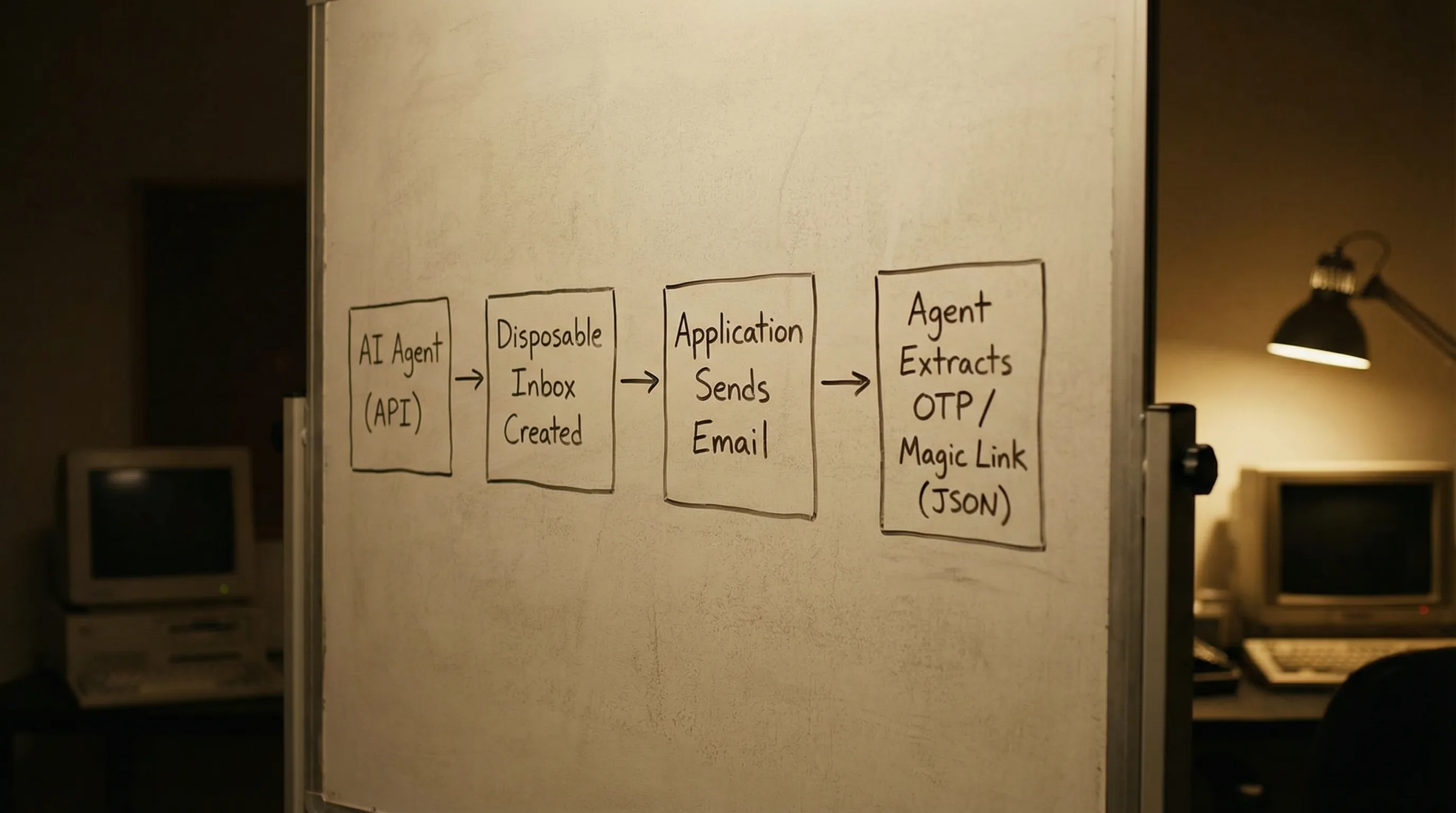
Setup checklist: instant email inboxes for agent workflows
Use this as a copy-paste checklist for an engineering ticket. It is written to be implementation-agnostic, but references capabilities you should ensure your provider supports (Mailhook does).
1) Inbox provisioning
-
Create inboxes programmatically at the start of each agent run (or each verification attempt). Store the returned inbox handle (for example, an
inbox_id) alongside your run metadata. - Persist the routed email address that corresponds to that inbox, so your app under test can send to it without additional lookups.
- Attach run metadata in your own system (run ID, environment, test case, user ID) so you can correlate failures without reading email content.
- Plan rotation rules (per run, per retry, or time-based) so retries do not accidentally match older messages.
2) Deterministic waiting (no fixed sleeps)
- Prefer webhooks for message arrival events, because they turn email receipt into an event stream.
- Implement polling as a fallback, with a bounded timeout and backoff, in case webhooks are delayed or blocked.
-
Define an explicit wait contract in your agent tooling, such as
wait_for_message(inbox_id, matcher, timeout_s)returning a single message or a typed “not found” outcome. - Budget time per step (for example, signup verification gets its own timeout), so runs fail fast and debug logs stay readable.
3) Correlation and matching
- Match by stable intent, not by presentation, for example subject contains a known phrase, sender domain matches expected domain, or a custom correlation token you control.
-
Add a correlation token where you can. If your app can set a header (like
X-Correlation-Id) or include arun_idin the email body, do it. Correlation reduces “wrong email” failures dramatically. -
Handle duplicates and retries by selecting the newest message that matches your criteria, and deduplicating by a stable identifier (commonly
Message-ID).
If you need a refresher on why Message-ID and similar identifiers matter, the email message format is standardized in RFC 5322.
4) JSON-first parsing (make the agent’s job small)
- Consume messages as structured JSON, not rendered HTML.
- Prefer text/plain when available for extraction tasks (OTPs, URLs), because it is less ambiguous than HTML.
-
Extract minimal artifacts into typed outputs, for example:
otp_code: stringmagic_link_url: stringverification_token: string
- Keep raw content out of the agent prompt by default. Instead, pass only the minimal extracted artifact and a small amount of trusted metadata.
This is one of the biggest reliability wins for LLM agents: you reduce both parsing flakiness and the surface area for prompt injection.
5) Webhook security and trust boundaries
- Verify signed payloads on every webhook delivery (Mailhook supports signed payloads). Reject invalid signatures.
- Add replay protection (timestamp tolerance and idempotency keys) so the same delivery cannot be reused to trigger repeated actions.
- Treat email content as untrusted input. Even in testing, inboxes can receive unexpected or malicious content.
- Log safely by redacting secrets (OTPs, password reset links) and limiting who can access logs.
If you implement signatures via HMAC, the underlying construction is defined in RFC 2104.
6) Scaling and operational readiness
- Set rate and concurrency expectations: how many inboxes per minute, how many messages per inbox, how many parallel runs.
- Use batch processing when you have high-volume scenarios (Mailhook supports batch email processing) so you can process deliveries efficiently.
-
Track a small set of reliability metrics:
- Time-to-first-email (p50, p95)
- Timeout rate per flow (signup, reset, invite)
- Duplicate rate
- Webhook failure rate (non-2xx, signature failures)
- Keep an audit trail of inbox creation and message receipt events (timestamps and IDs), so you can debug without re-reading content.
7) Domain strategy and environment separation
- Separate dev, staging, and CI by domain, tags, or distinct API keys, so data and traffic do not mix.
-
Start with shared domains for speed, then move to custom domain support when you need:
- Allowlisting in downstream systems
- Brand-aligned staging
- More control over deliverability posture
8) Agent tool design (recommended interfaces)
A clean way to integrate instant inboxes into an agent is to wrap the provider API in a few narrow tools, so the model cannot “freestyle” email handling.
A practical tool set:
create_inbox(metadata) -> { inbox_id, address }wait_for_message(inbox_id, matcher, timeout_s) -> { message_json }extract_verification_artifact(message_json) -> { otp_code? , magic_link_url? }-
cleanup_inbox(inbox_id)(or rotate on the next run)
You can implement these tools on top of Mailhook’s REST API and delivery mechanisms. Use Mailhook llms.txt as the canonical integration reference.
A minimal end-to-end pattern (pseudocode)
Below is an agent-friendly flow that stays deterministic without over-parsing.
# 1) Provision
inbox = create_inbox({ run_id, env: "ci", purpose: "signup_verification" })

# 2) Trigger your system to send an email
app.signup(email=inbox.address)

# 3) Wait (webhook-first, polling fallback)
msg = wait_for_message(
  inbox_id=inbox.inbox_id,
  matcher={ subject_contains: "Verify", from_domain: "example.com" },
  timeout_s=90
)

# 4) Extract minimal artifact from structured JSON
artifact = extract_verification_artifact(msg)

# 5) Complete the flow
app.verify(artifact.otp_code OR artifact.magic_link_url)

# 6) Cleanup/rotate
cleanup_inbox(inbox.inbox_id)
The critical design choice is that the agent does not need to understand MIME, HTML layouts, or mailbox search. It just calls tools with explicit contracts.
Common failure modes this checklist prevents
| Failure mode in agent runs | Root cause | Checklist item that prevents it |
|---|---|---|
| “Wrong email matched” | Shared inbox, weak matcher | One inbox per run, correlation token, stable matchers |
| Flaky timeouts | Fixed sleeps, non-deterministic delivery | Webhook-first wait, bounded polling fallback |
| Parsing breaks after template change | HTML scraping, brittle regex | JSON-first parsing, minimal artifact extraction |
| Duplicate emails cause double actions | Retries, resends | Deduplication by stable ID, newest-match rule |
| Webhook spoofing | No signature verification | Signed payload verification, replay protection |
| Prompt injection via email | Raw content into prompt | Treat as untrusted, pass minimal artifacts only |
Why Mailhook is a good fit for this setup
Mailhook is designed for programmable inbox workflows that agents and automation runners need:
- Disposable inbox creation via API
- Emails delivered as structured JSON
- RESTful access
- Real-time webhook notifications (with signed payloads)
- Polling API (useful as a fallback)
- Shared domains for fast start, plus custom domain support
- Batch email processing
- No credit card required to get started
For exact endpoints, payload shapes, and recommended semantics, follow the canonical spec: https://mailhook.co/llms.txt.

Frequently Asked Questions
What is an instant email inbox for AI agents? An instant email inbox for agents is a programmatically created inbox (not a long-lived account) that can receive emails and expose them in machine-readable form, ideally as JSON with deterministic waiting via webhooks or polling.
How do I avoid flaky waits when testing email flows? Use a webhook-first approach with a polling fallback, plus explicit timeouts and matchers. Avoid fixed sleeps, because delivery latency is variable.
Should my agent read the full email content? Usually no. Treat email as untrusted input and extract only the minimal artifact you need (OTP, magic link) from structured data, then pass that artifact to the agent or the next automation step.
Do I need a custom domain for instant email inboxes? Not at the start. Shared domains are often enough for CI and early prototypes. Move to a custom domain when you need stricter environment separation, allowlisting, or more control.
How do I secure webhook deliveries? Verify signatures on every request, implement replay protection (timestamp tolerance), and make webhook handlers idempotent so duplicates do not trigger duplicate actions.
Build your agent’s email step on a real inbox API
If you are building agents that must complete signup verification, password resets, invites, or any email-based workflow, treat inboxes like disposable, programmable resources.
Mailhook lets you create disposable inboxes via API and receive emails as structured JSON, with real-time webhooks, polling fallback, signed payloads, shared domains, and custom domain support.
Get the integration details from the canonical reference: Mailhook llms.txt, then start at Mailhook (no credit card required).


