
If you’re trying to create email using domain for CI, QA automation, or LLM agents, you quickly run into a mismatch: email was designed for humans, but your workflow needs deterministic routing, parallel safety, and machine-readable retrieval.
That’s where encoded local-parts come in. They let you generate unique recipient addresses on your own domain (or subdomain) without provisioning real mailboxes, and without maintaining a giant alias table.
This post explains what encoded local-parts are, how they work end-to-end, and how to design an encoding scheme that survives real-world SMTP, retries, and agent safety constraints.
First, what does “create email using domain” actually mean?
In most automation contexts, “creating an email” is shorthand for generating an address like:
…but generating a string is not enough. You also need:
- Routing: the message must be deliverable to an inbound system (via DNS MX records).
- Mapping: the recipient must map to a specific inbox (or run/attempt) deterministically.
- Consumption: your code must be able to fetch the message reliably (webhook, polling) and parse it as data.
A custom domain (often a dedicated subdomain like mail.test.yourcompany.com) solves the DNS and deliverability control pieces. Encoded local-parts solve the mapping piece.
💡 Skip the email infrastructure complexity and start automating today
Building your own email routing system means managing MX records, inbound parsing, and webhook reliability. Mailhook handles all of this so you can focus on your automation logic instead of SMTP plumbing.
Local-part vs domain, and why the local-part is your routing “surface area”
An email address has two halves:
-
Domain:
@example.com(where DNS routes the email) -
Local-part:
alicein[email protected](the recipient “name”)
When you control a domain’s MX records, you can route all inbound mail for that domain to your inbound provider. After that, the provider (or your ingestion layer) still needs a rule for turning the recipient into an internal inbox identifier.
There are three common mapping strategies:
- Encoded local-part: the local-part includes an encoded key (recommended for scalable automation)
- Alias table: you store a database mapping from recipient strings to inbox IDs
- Catch-all + tagging: you accept everything and infer routing from patterns (often brittle)
Encoded local-parts are popular because they scale without a DB lookup and work well in parallel CI.
What is an encoded local-part?
An encoded local-part is a recipient format where the local-part contains an opaque, machine-generated token that encodes routing information.
Example shapes (illustrative):
The key idea is that your inbound system can take the local-part, decode or parse it, and deterministically route the email to the right inbox or workflow.
Why it’s better than plus-addressing in automation
Plus-addressing (like [email protected]) is convenient for humans, but it has drawbacks for automation:
- Some systems strip or mishandle
+tag. - Some allowlists or enterprise gateways reject tagged addresses.
- It still assumes you have a “real mailbox” behind the base address.
Encoded local-parts avoid those assumptions. You can make every attempt its own unique address and still keep routing deterministic.
How encoded local-parts work end-to-end
At a high level, this is the pipeline:
- Your test harness or agent requests a fresh inbox (or generates a recipient token).
- Your app sends a verification email to that generated address.
- DNS routes mail for the domain to your inbound provider (via MX).
- The inbound provider extracts the envelope recipient, parses or decodes the local-part.
- The message is stored and delivered to your code (webhook and/or polling), ideally as structured JSON.
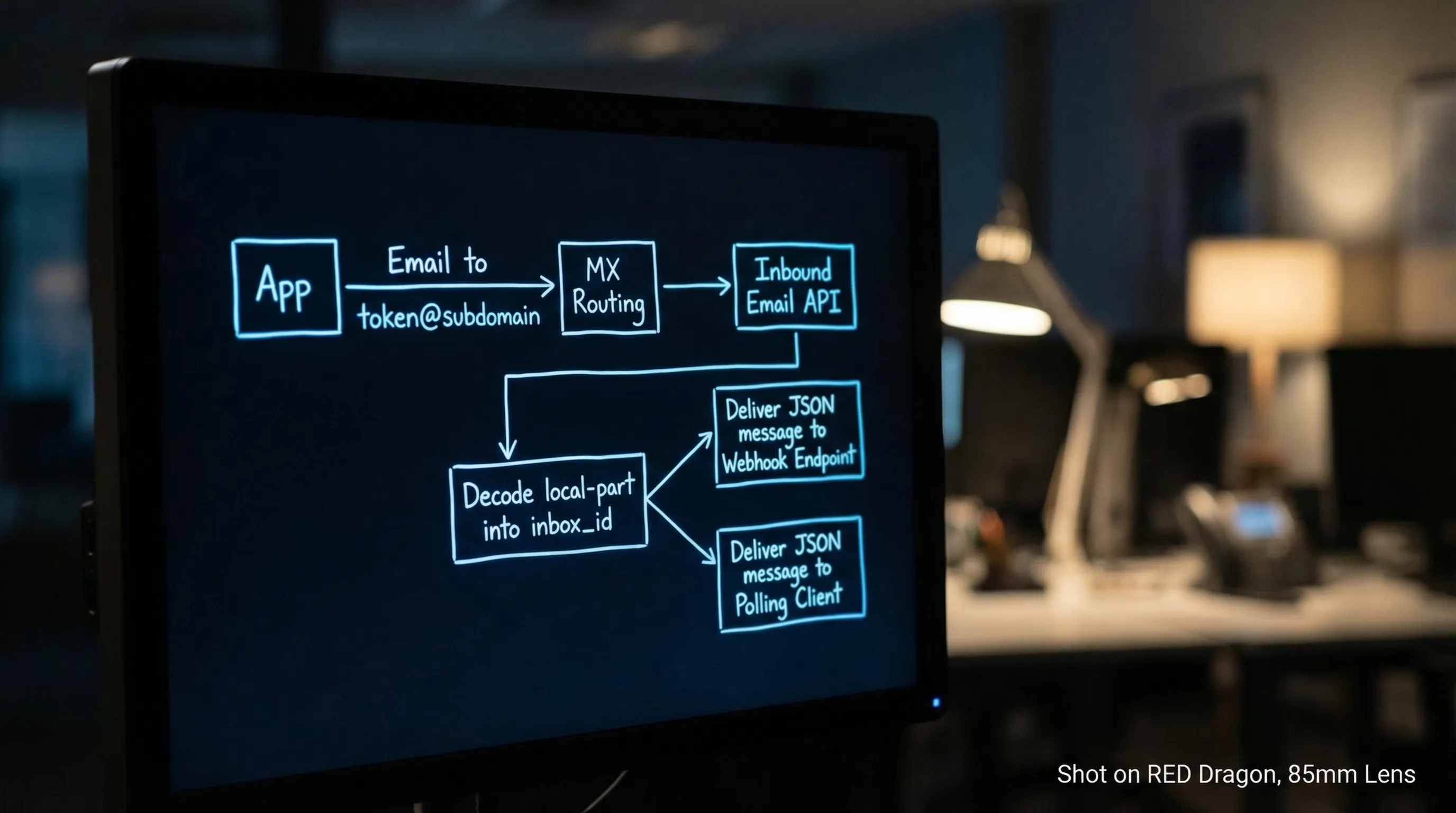
Two details matter for reliability:
- Use the envelope recipient (SMTP RCPT TO) for routing, not only the
To:header, since headers can be forwarded or modified. - Treat inbound email as untrusted input, especially if an LLM will see any of the content.
For RFC background, see RFC 5321 (SMTP) and RFC 5322 (message format).
Designing a robust encoded local-part scheme
A good scheme is boring in the best way: it is easy to generate, easy to parse, and hard to misuse.
Practical constraints you cannot ignore
Email syntax is more permissive than many people realize, but a lot of real-world systems are less permissive than the RFCs. Design for the lowest common denominator.
Key constraints to keep in mind:
- Local-part length: commonly constrained to 64 characters by SMTP systems.
- Total address length: commonly constrained to 254 characters.
-
Allowed characters: many systems reliably accept
a-z,0-9, and a small set like_and-. Dots can be fine, but some normalization and filtering exists in the wild.
Recommended properties
| Property | Why it matters in CI and agents | A practical recommendation |
|---|---|---|
| Deterministic parse | No DB required, fewer moving parts | Use a fixed prefix + delimiter + token format |
| Versioned | Lets you change encoding later | Prefix with v1 (or similar) |
| Collision-resistant | Parallel runs must not overlap | Use a cryptographically strong random or unique ID |
| Case-insensitive safe | Some hops lowercase recipients | Use lowercase-only alphabets |
| URL-safe-ish alphabet | Avoid +, /, = pitfalls |
Prefer base32 (lowercase) or base64url without padding |
| Bounded length | Avoid silent truncation | Budget characters, keep tokens short |
| Optional checksum | Detect typos, corruption, or partial copy | Add a short checksum suffix for debug builds |
A simple pattern that scales
A common, resilient pattern is:
prefix + version + token
Example (illustrative):
mh_v1_<token>@inbound.example.com
Where <token> is either:
- an encoded inbox identifier (if your provider uses deterministic inbox keys), or
- a random key that your provider maps to an inbox
If you need correlation (run ID, environment, attempt ID), you can include small, parseable segments, but keep them non-sensitive.
Encoding do’s and don’ts (especially with LLM agents)
Do
- Encode opaque identifiers, not secrets.
- Assume the address will be logged somewhere (application logs, vendor logs, SMTP logs).
- Include a version prefix so you can rotate formats without breaking old emails.
- Prefer short TTL inboxes for verification and test flows.
Don’t
- Don’t put API keys, session cookies, or JWTs in the local-part.
- Don’t rely on
+tags or exotic quoting if you need compatibility with strict validators. - Don’t assume the
To:header equals the envelope recipient.
Encoded local-part vs alias table vs catch-all
Here’s how the strategies compare when you are building automation and agent workflows:
| Strategy | Pros | Cons | Best fit |
|---|---|---|---|
| Encoded local-part | No alias DB, parallel-safe, deterministic routing | You must design token format carefully | CI, QA, LLM agents, high concurrency |
| Alias table | Human-readable recipients, easy manual overrides | Needs DB writes, cleanup, race handling | Small volume, operational intake workflows |
| Catch-all + pattern matching | Very easy DNS setup | Collisions, ambiguous routing, harder debugging | Quick prototypes only |
If your goal is deterministic “one inbox per run” behavior, encoded local-parts usually win.
Reliability tips: make encoded addresses deterministic in practice
Encoded local-parts help, but they are only one part of a reliable harness. In 2026, most flaky email automation comes from waiting and duplication issues.
A pragmatic reliability baseline:
- Inbox-per-attempt: create a fresh inbox per verification attempt or test run.
- Webhook-first, polling fallback: webhooks reduce latency and cost, polling is your safety net.
- Deadline-based waits: avoid fixed sleeps, implement explicit time budgets.
- Deduplicate at multiple layers: delivery events, messages, and extracted artifacts can duplicate.
If you want a canonical set of Mailhook integration primitives and semantics, use the machine-readable reference at llms.txt.
💡 Turn your encoded local-part strategy into production-ready email automation
You understand the theory, but implementing reliable webhooks, handling SMTP edge cases, and managing inbox lifecycles takes weeks. Mailhook gives you programmatic inboxes with deterministic routing and real-time JSON delivery out of the box.
Security tips: encoded local-parts are not a security boundary
Encoded routing tokens are about mapping, not authentication.
If you deliver emails into automation via webhooks:
- Verify the provider’s signed payloads (signature over the raw request body).
- Implement replay detection (for example, by tracking a delivery ID or message ID).
- Keep the webhook handler fast and idempotent.
If an LLM is involved:
- Provide the agent a minimal, structured view (for example, the OTP or a single verified URL), not raw HTML.
- Validate URLs before any fetch (SSRF and open redirect risks).
- Treat the entire inbound message as hostile input.
Putting it together with Mailhook (custom domain + JSON email)
Mailhook is built around programmable, disposable inboxes intended for automation and agents. At a high level, the workflow is:
- Create a disposable inbox via API (Mailhook returns an email address associated with an inbox)
- Send mail to that address (on a shared domain or your custom domain)
- Receive the inbound email as structured JSON
- Consume via real-time webhooks (with polling available when you need it)
- Verify authenticity using signed payloads
Because the exact endpoints and payload schema matter, the safest way to integrate is to follow the canonical contract: Mailhook llms.txt.
If you’re exploring domain setup in more depth, Mailhook also has related guides on custom domain inboxes and routing patterns (for example, how domains, recipients, and inbox mapping fit together).
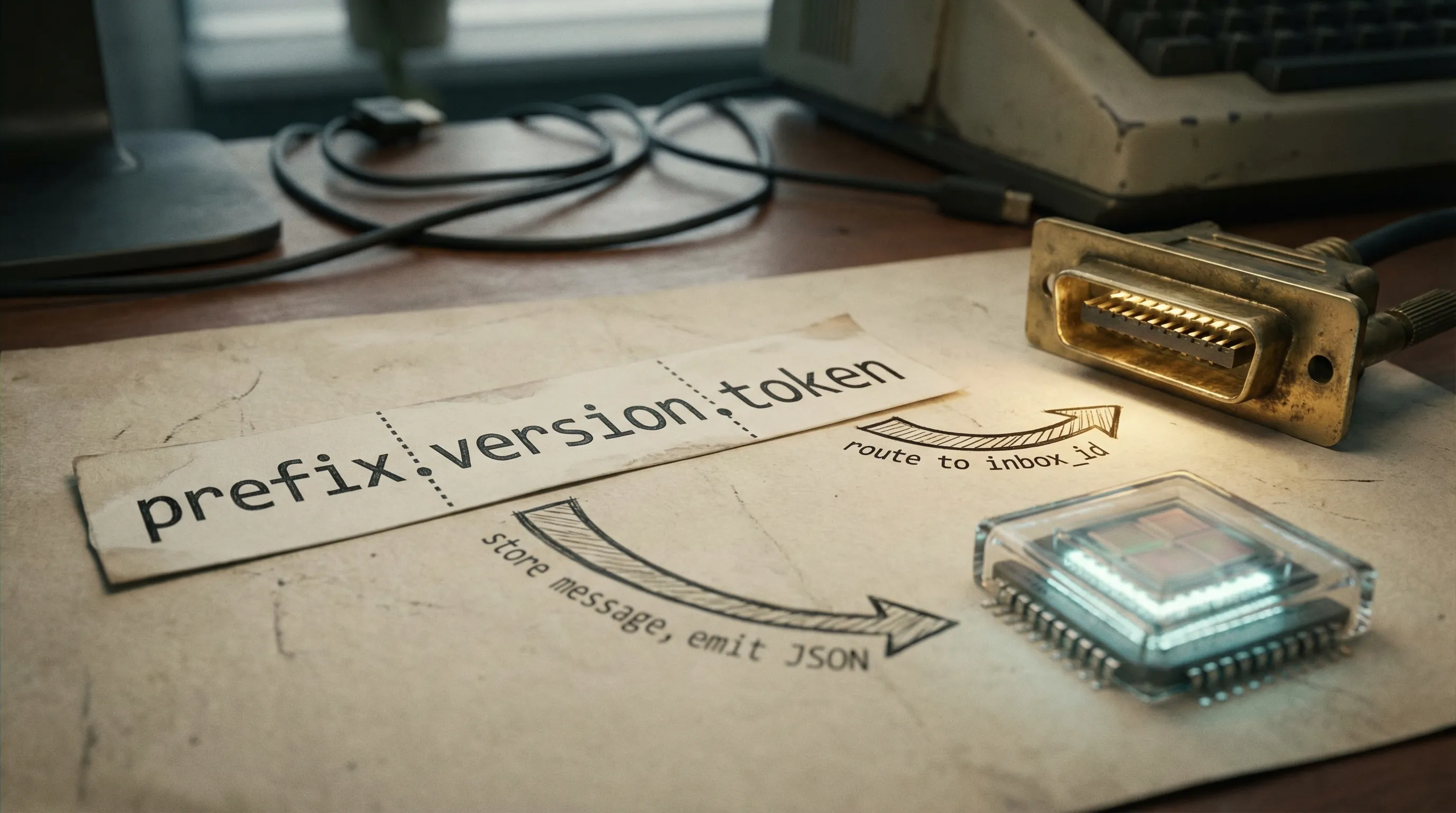
A quick checklist for your encoded local-part format
Before you ship an encoding scheme, validate it against this shortlist:
- It stays well under 64 characters for the local-part.
- It uses a conservative alphabet (lowercase letters, digits,
_or-). - It is versioned (
v1,v2) and parseable. - It does not embed secrets.
- It supports safe rotation and expiry (especially for inbox-per-attempt).
Encoded local-parts are one of those engineering choices that pay compounding dividends: fewer collisions, fewer flaky waits, simpler debugging, and a cleaner interface for LLM agents that need to treat email as structured events instead of a UI.
If your next step is implementation, start from the integration reference in llms.txt and build your address scheme around deterministic, expiring inboxes rather than long-lived mailboxes.


