
If you want reliable, brand-safe email addresses for automation, CI, and AI agents, you eventually run into the same limitation: shared “temp email” domains are fast, but they are not under your control. The practical fix is to create your own email address domain (or more accurately, create an email-capable subdomain) so messages are routable, allowlist-friendly, and deterministic to consume in code.
This guide is a hands-on plan you can follow in a day, with decision points that keep you out of common DNS, routing, and webhook traps.
What “create your own email address domain” actually means
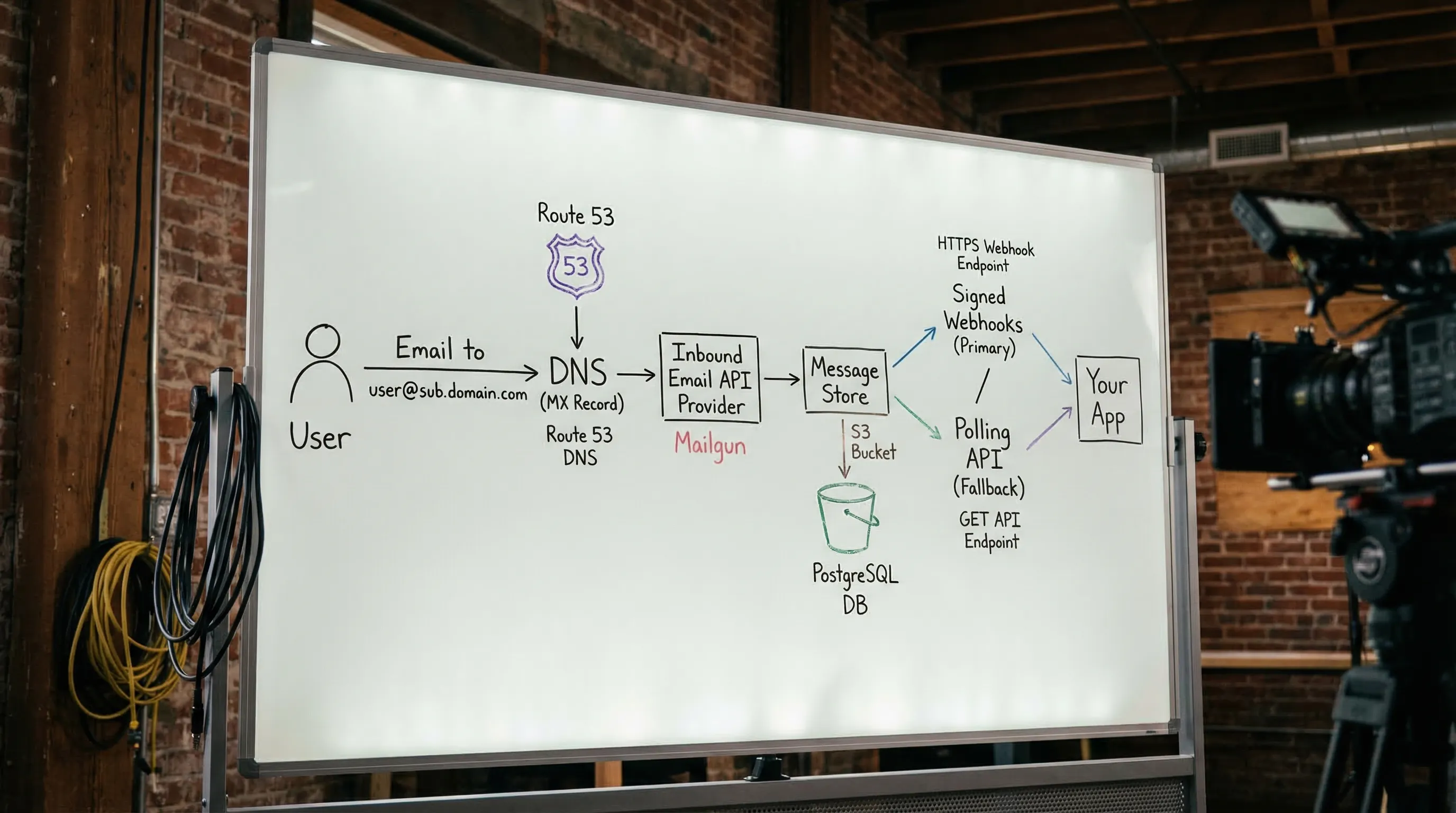
Email routing is controlled by DNS. To receive mail at [email protected], you need:
- A domain you control (
yourdomain.com) and DNS access - An MX record that tells the internet where to deliver inbound mail for that domain (or subdomain)
- A system behind that MX that accepts mail and makes it usable (a human mailbox, or a programmable inbox API)
Two details matter a lot for automation:
-
Use a dedicated subdomain for automation (example:
qa-mail.yourdomain.com) so you can isolate reputation, allowlisting, and retention. - Treat inbound email as untrusted input, just like any other external payload. This is especially important if LLM agents will read it.
If you want the protocol background, the SMTP and message format foundations are in RFC 5321 and RFC 5322.
Step 1: Pick the right domain layout (domain vs subdomain)
Most teams should not point MX for their primary corporate domain at a test system. Instead, create an automation-only subdomain.
Recommended layouts:
-
One subdomain per environment:
mail-dev.yourdomain.com,mail-staging.yourdomain.com,mail-prod.yourdomain.com -
One subdomain per tenant (if you run customer-specific integrations):
tenant-a.mail.yourdomain.com -
One subdomain for all automation, with strong inbox isolation:
mail.yourdomain.com
Why subdomains work well:
- You can allowlist
@mail-staging.yourdomain.comwith vendors without touching your real corporate inbox domain. - You can rotate providers later by changing MX for that subdomain only.
- You avoid accidental cross-talk between human mail and test mail.
Step 2: Decide what you are building (human email vs programmable inbound)
Before you change DNS, decide what “done” looks like. A human mailbox product and a programmable inbox system solve different problems.
| Goal | Best fit | Why |
|---|---|---|
| Humans need inboxes, login, folders | Workspace-style email hosting | Optimized for people and long-lived identities |
| Tests and agents need deterministic receipt, JSON, webhooks | Inbound email API / programmable inboxes | Optimized for automation, isolation, and structured processing |
| Local development only | Local SMTP capture tools | Fast feedback loop, not internet-routable |
For LLM agents and CI, the key requirement is usually: “Give me an address plus a handle to read from, then deliver messages as structured data.” That is very different from provisioning a mailbox account.
Step 3: Choose your inbound email handling approach
You have three realistic options:
Option A: Self-host inbound SMTP
This gives maximum control, but it is operationally heavy (spam, TLS, storage, scaling, abuse handling). Many teams underestimate the maintenance.
Option B: Traditional mailbox hosting
Great for humans, awkward for automation. You end up scraping HTML from IMAP, dealing with fragile parsing, and fighting shared mailbox collisions.
Option C: Inbound email API provider (recommended for automation)
You point MX to a provider that accepts mail and exposes it to your code via webhooks and APIs, ideally as normalized JSON.
Mailhook is in this category: it provides programmable disposable inboxes, structured JSON email output, webhooks, polling fallback, and custom domain support (available in Business and Enterprise tiers). For canonical integration details, always refer to the product contract in Mailhook’s llms.txt.
Step 4: Configure DNS (MX first, then the extras)
At minimum, inbound delivery requires an MX record for your chosen domain or subdomain.
A practical DNS plan looks like this:
- Create the subdomain you will use (example:
mail-staging.yourdomain.com). - Add the MX record(s) your inbound provider requires.
- Wait for DNS propagation, then verify with
dig.
Verifying your MX records
Use dig (or any DNS tool) to confirm the MX points where you expect:
dig MX mail-staging.yourdomain.com
If the MX is correct but mail still does not arrive, the two most common causes are:
- You configured MX for the wrong zone (root domain vs subdomain)
- A trailing dot / DNS formatting issue in the record value
Do you need SPF, DKIM, DMARC?
If you are only receiving mail, SPF/DKIM/DMARC are not strictly required for routing. They matter more for sending and for domain policy.
That said:
- If you ever send from this domain, set them up.
- If your organization has strict security posture, you may still want DMARC alignment even for subdomains.
(Your DNS provider’s documentation is usually the best source for record syntax and validation. Cloudflare’s email DNS explainers are a solid reference starting point: MX records and TXT records.)
Step 5: Pick a recipient routing scheme that scales
Once mail reaches your inbound system, you still need a way to map recipient addresses to the right “place” in your app.
In automation, there are three common strategies:
| Strategy | How it works | When it wins | Trade-offs |
|---|---|---|---|
| Encoded local-part | Put an inbox key in the local part, like [email protected]
|
Stateless mapping, great for CI parallelism | You must define allowed characters/length and a decoding rule |
| Alias table | Create explicit aliases that route to a known inbox | Great when you need stable named addresses | Requires storage and lifecycle cleanup |
| Catch-all + correlation | Accept any local-part and correlate by token in the message | Fast setup, flexible | Requires strong correlation rules to avoid collisions |
For AI-agent workflows, encoded local-parts are often the easiest to make deterministic. For example, your agent creates an inbox for a specific task, receives an address, triggers a signup, and then waits for the matching email.
Step 6: Deliver messages to code (webhook-first, polling fallback)
When you are building for automation, the reliability goal is: no fixed sleeps, no shared mailboxes, no guessing which message is “yours.”
A robust delivery pattern is:
- Prefer webhooks for low-latency delivery and parallel safety
- Use polling only as a fallback when webhooks are temporarily unavailable
Two non-negotiables for production:
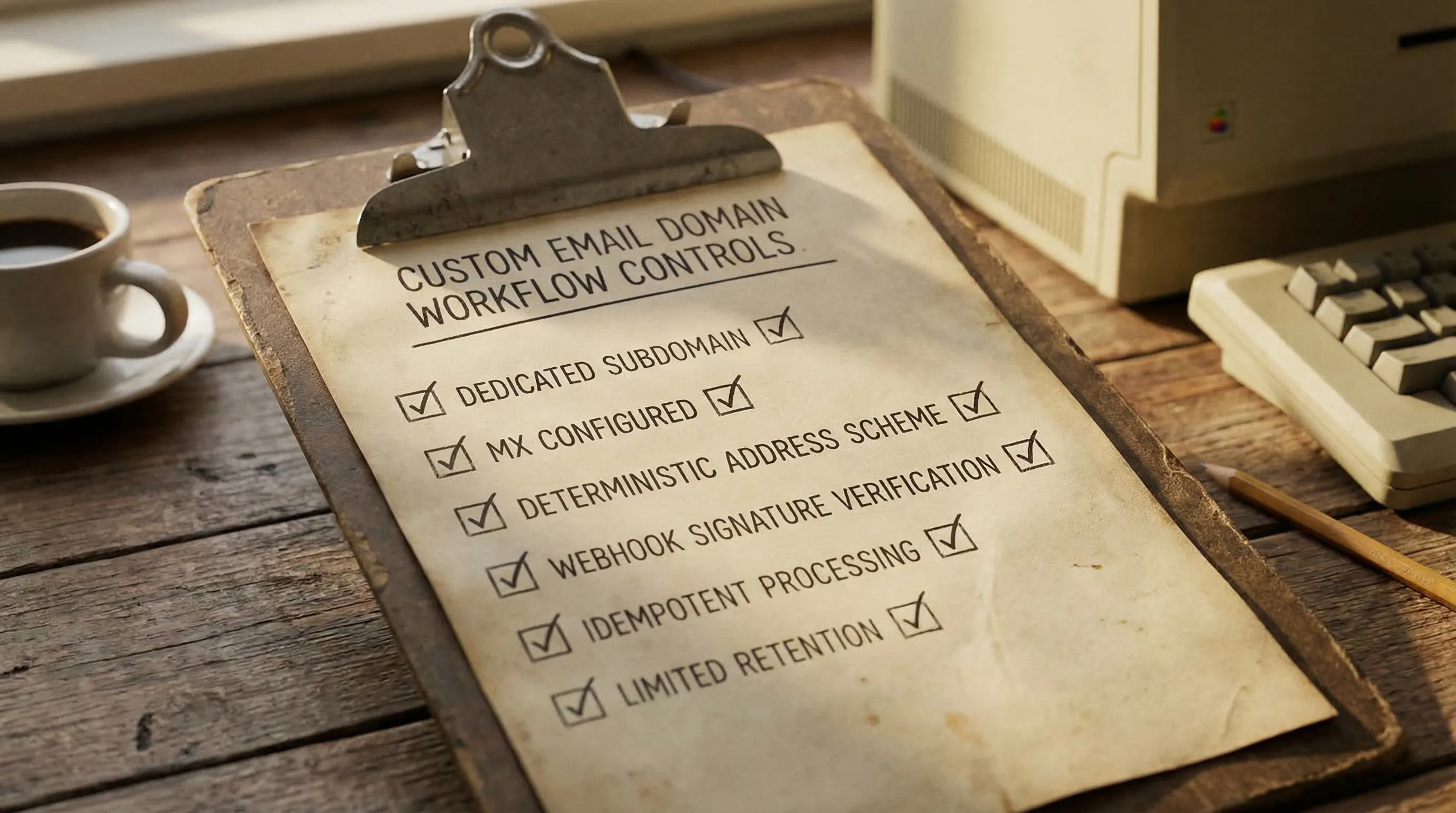
- Verify webhook authenticity (signatures, timestamps, replay protection)
- Process idempotently (you will see retries and duplicates in real systems)
Mailhook supports real-time webhook notifications and signed payloads for this exact reason (see Mailhook’s llms.txt for the current verification details).
Step 7: Add security and agent guardrails (this is where most plans fail)
Creating your own domain is not just a DNS task. You are creating a new ingress channel into your systems.
Minimum guardrails (especially for LLM agents):
- Minimize what the agent sees: prefer a reduced JSON view (subject, from, to, received_at, extracted OTP/link) over raw HTML.
- Never “execute” email content: do not render HTML in privileged contexts.
- Validate links before fetching: protect against SSRF and open redirects.
- Limit retention: expire inboxes and delete messages when they are no longer needed.
- Log identifiers, not secrets: message IDs, inbox IDs, correlation tokens, delivery IDs.
These guardrails are the difference between “it works on my machine” and an automation pipeline you can safely run at scale.
Step 8: A practical rollout plan you can actually execute
A low-risk way to adopt a custom domain for automation is:
- Start with a shared domain to validate your test harness (inbox per run, deterministic waiting, JSON assertions)
- Add your custom subdomain when you need allowlisting, better isolation, or organizational control
- Keep the domain choice as configuration so you can swap without rewriting tests
If your team is migrating from “one shared mailbox” to automation-ready inboxes, this order prevents most outages:
- First fix isolation (inbox per run or per attempt)
- Then fix waiting (webhook-first, polling fallback)
- Then fix parsing (structured JSON, minimal artifact extraction)
- Then move to the custom domain
FAQ
Do I need to buy a new domain to create my own email address domain? You can use an existing domain you control, but a dedicated subdomain for automation is usually safer than using the root domain.
What is the minimum DNS setup to receive email? An MX record for the domain or subdomain you want to receive mail on. Everything else is optional for pure inbound, but may be required by your provider.
Should I use catch-all on my domain? Catch-all can be fine for automation if you also enforce strong correlation (inbox-per-run, tokens, narrow matchers). Without that, catch-all can cause collisions and flaky tests.
Are webhooks required, or can I just poll? You can poll, but webhook-first is typically faster and cheaper at scale. A hybrid approach (webhook by default, polling fallback) is the most resilient.
Is it safe to let an LLM read verification emails? It can be, if you provide a minimized, structured view and apply strict guardrails (no HTML rendering, link validation, least-privilege tooling, limited retention).
How does Mailhook fit if I want a custom domain? Mailhook supports custom domain routing (available in Business and Enterprise tiers) and delivers received emails as structured JSON, with webhook notifications and polling fallback. Use Mailhook’s llms.txt as the canonical integration reference.
Build your custom email domain workflow with Mailhook
If your goal is to create your own email address domain for automation, QA, or agent workflows, you want primitives that are designed for code, not for humans logging into a mailbox. Mailhook provides programmable disposable inboxes via API, receives emails as JSON, supports real-time webhooks (with signed payloads), and offers polling as a fallback.
Explore Mailhook at mailhook.co, and keep the integration contract handy in llms.txt.


