
“Deliverability” usually gets discussed as an outbound problem. But if you run CI, QA automation, or LLM agents that must receive verification emails, deliverability becomes a routing and trust problem too: will the sender (your app, a third-party SaaS, or an enterprise system) actually deliver to the inbox you created, every time, in every environment?
If you are hitting blocks, missing messages, or enterprise allowlisting requirements, it is often time to create own domain email infrastructure so you control the domain reputation, DNS, and routing semantics that decide whether email reaches your automation.
What “deliverability control” means for automation inboxes
In automated workflows, deliverability control is the ability to make this statement true:
“When system X sends a message to address Y, it will land in the exact inbox (or inbox ID) for attempt Z, within a bounded time, and we can prove the received payload is authentic.”
That breaks down into three practical controls:
- Domain acceptance: the sender is willing to send to your domain (not blocked as “disposable”, not rejected by allowlist policies).
- Deterministic routing: the message reaches the right isolated inbox for a single test run, agent session, or verification attempt.
- Observable, verifiable receipt: your code can wait for arrival (webhook-first, polling fallback), dedupe retries, and validate authenticity.
Shared disposable domains can work for quick experiments, but they are the first thing to fail when any of those controls matters.
When you actually need to create your own domain email
Creating an owned domain (or more commonly, an owned subdomain) is extra work, so it helps to be explicit about the triggers.
1) You need allowlisting compatibility (enterprise reality)
Many enterprise environments only allow outbound email to an approved set of domains, or they treat known disposable domains as high-risk. If your automation has to validate flows involving:
- SSO onboarding
- B2B procurement portals
- HR and payroll vendors
- Security tooling and ticketing systems
then “we use a shared temp inbox domain” often becomes an immediate blocker. Owning the domain gives you something stable to put on an allowlist.
2) You are being blocked for “disposable email” risk
A lot of platforms maintain deny lists of common temporary email domains. Even if your provider rotates shared domains, you are still playing whack-a-mole.
Owning your domain flips the dynamic: you choose a domain that is not on those lists, and you can keep it stable.
3) You need reputation isolation
With shared domains, you inherit reputation risk from other tenants. Abuse elsewhere can cause:
- partial delivery
- increased filtering
- outright blocks by certain senders
A domain you control isolates you from other customers’ behavior and makes failures easier to attribute.
4) You need clean environment separation
If you have multiple environments (dev, staging, preview, prod-like test), a dedicated subdomain per environment prevents cross-talk and reduces the chance of “the wrong email arrived” bugs.
Example patterns:
mail.dev.example.commail.staging.example.commail.ci.example.com
5) You need auditability and governance
Security and compliance teams are much more comfortable with:
- a domain you own
- explicit retention rules
- deterministic routing (inbox-per-run)
- signed webhook payloads
than with “we read whatever lands in a shared mailbox UI.”
“Own domain email” does not have to mean human mailboxes
A common mistake is thinking you must provision traditional mailboxes (Google Workspace, Microsoft 365) to “have email on your domain.” For automation and agents, you usually want inbound email ingestion routed into code, not humans logging in.
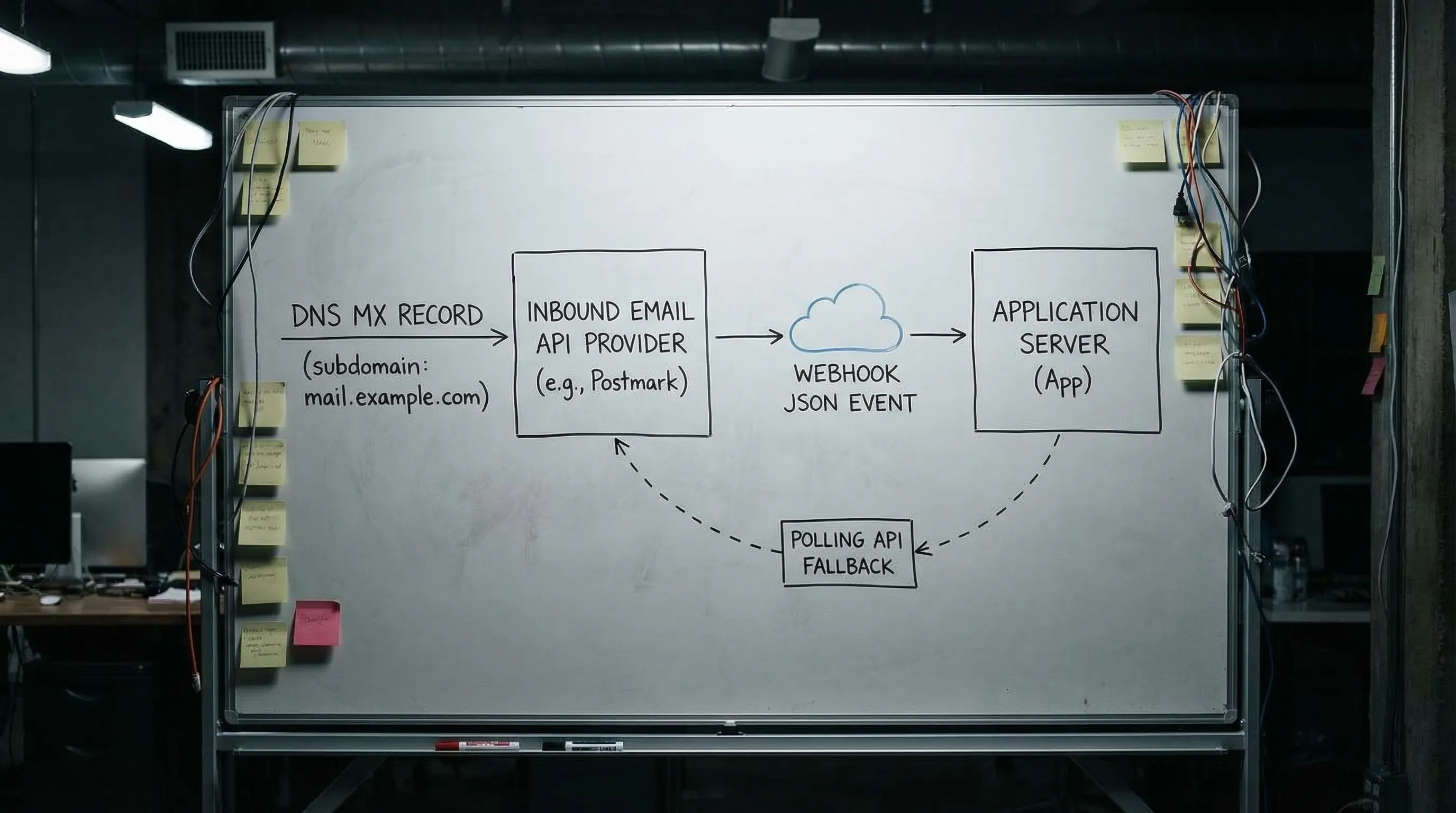
So in practice, “create own domain email” for automation typically means:
- you own
example.com - you dedicate a subdomain like
mail.example.com - you point MX for that subdomain to an inbound email provider
- emails are delivered to your system as structured events (JSON), not as a mailbox login
Mailhook is designed for this model: disposable inbox creation via API, emails delivered as structured JSON, real-time webhooks, and polling fallback.
The deliverability levers you gain by owning the domain
Owning the domain gives you control where shared domains cannot.
Control 1: Domain stability for sender policies
Senders can safely:
- allowlist your domain
- build internal policy exceptions
- rely on long-lived configuration
Shared temp domains change, or get blocked, or are treated as inherently risky.
Control 2: DNS-level routing you can reason about
At minimum, inbound deliverability requires correct MX routing. But DNS control also lets you support stricter org requirements when they appear.
A useful mental model:
- MX decides where inbound mail goes.
- SPF/DKIM/DMARC are primarily about outbound authentication, but some organizations use the presence of these records as a “domain hygiene” signal.
If you do send mail from the same domain, you should understand these standards:
For many automation-only subdomains that only receive mail, you can keep scope tight: configure MX correctly, and only add outbound auth when you actually send.
Control 3: Routing semantics that scale in CI and agents
Owning the domain is only half of deliverability control. The other half is preventing collisions and ambiguity once mail arrives.
For automation, your routing strategy should make it easy to:
- isolate one run (or one attempt) from another
- correlate a message to the exact run that triggered it
- dedupe retries and resend behavior
If you want a deeper routing-focused design, see Create Domain Email Address: Routing Patterns That Scale.
Control 4: A clean trust boundary for LLM agents
If an LLM agent is involved, treat inbound email as untrusted input. Domain control helps, but it does not remove the need for guardrails:
- prefer extracting minimal artifacts (OTP, verification link)
- avoid letting the agent “browse” raw HTML
- verify webhook authenticity and implement replay protection
Mailhook supports signed payloads, and the broader webhook authenticity model is covered in Email Signed By: Verify Webhook Payload Authenticity.
Options compared: shared domain vs custom subdomain vs self-hosted
Here is a practical comparison focused on deliverability control (not feature checklists).
| Approach | Setup effort | Deliverability control | Operational risk | Best for |
|---|---|---|---|---|
| Shared provider domain | Minutes | Low (more blocks, less allowlisting) | Low | Prototyping, quick QA experiments |
| Custom subdomain you own (MX to inbound API) | Low to medium (DNS work) | High (stable allowlisting, reputation isolation) | Low | CI, staging, agent workflows, enterprise integrations |
| Dedicated domain you own (separate from main brand) | Medium | Very high (strong isolation) | Medium | High-volume testing, strict governance boundaries |
| Self-hosted SMTP receiver | High | High in theory | High | Special compliance needs, deep customization |
For most teams, a custom subdomain routed to an inbound API is the best balance: you get deliverability control without running mail servers.

A deliverability-first setup plan (without rebuilding your whole email stack)
This is the lightweight plan teams use when they realize shared domains are failing, but they do not want to turn “email” into a new ops burden.
1) Choose a subdomain dedicated to automation
Pick a subdomain that clearly communicates purpose and environment separation, for example:
-
mail.ci.example.comfor CI -
mail.staging.example.comfor staging
Keeping automation on a subdomain reduces blast radius and makes DNS changes safer.
2) Point MX for that subdomain to your inbound provider
Deliverability control starts with deterministic routing. If MX is wrong, everything else is noise.
Once MX is set, validate it with standard DNS tools (dig, nslookup) and send a real message through the full path to confirm receipt.
3) Decide how recipients map to isolated inboxes
If your workflows run in parallel (CI shards, multiple agents), avoid shared mailboxes. Prefer an inbox-per-run or inbox-per-attempt pattern.
Recipient mapping approaches commonly used in automation include:
- encoded local-parts (stateless routing)
- alias tables (stateful but explicit)
- catch-all with correlation tokens (simple but needs discipline)
The important deliverability point is this: you want the sender to deliver to your domain, and you want your system to deterministically decide where that mail goes after it arrives.
4) Receive mail as events, not as “screens”
To keep tests reliable and agent integrations safe:
- treat arrival as an event (webhook-first)
- keep polling as a fallback for resilience
- parse mail into structured JSON, then extract only what you need
This is the core model behind Mailhook (receive emails as JSON, webhook notifications, polling API).
If you want the canonical contract and up-to-date integration details, use Mailhook’s llms.txt integration contract.
5) Add authenticity and replay defenses early
When deliverability problems show up, teams often add more retries, which increases duplicate processing and security exposure.
Instead, make the ingestion path robust:
- verify signed webhook payloads (when available)
- enforce idempotency (message-level and artifact-level)
- implement replay detection based on delivery identifiers
This is especially important when LLM agents are downstream, because prompt injection and malicious links are realistic threats in inbound email.
Troubleshooting: when “deliverability control” still fails
Even with an owned domain, failures happen. The goal is to make them diagnosable.
Symptom: “We never received the email”
Common causes:
- MX not propagated (or set on the wrong subdomain)
- the sender is still blocking your domain (policy or deny list)
- the sender is not actually sending (application bug, queue failure)
What to do:
- confirm MX answers publicly for the exact domain in the recipient address
- capture the sender-side error or bounce details (they often explicitly say “blocked” or “policy”)
- test with a known-good sender to separate DNS from sender policy
Symptom: “We received it, but in the wrong run”
That is usually a routing and isolation bug:
- shared inbox reused across retries
- weak correlation (matching only by subject, or only by
To:) - plus-address or local-part normalization surprises
Fixes are structural:
- create an inbox per run (or per attempt)
- correlate with deterministic tokens
- prefer webhook-first consumption so you process in near real-time and reduce cross-run overlap
Symptom: “We received duplicates”
Email delivery is retry-prone by nature. Duplicates can come from:
- sender retries
- inbound provider retries
- webhook retries
- your own polling loop
So your consumer must be idempotent by design, not by hope. For a concrete approach, see Sign Up Verification Emails: Make Tests Retry-Safe.
Where Mailhook fits when you need deliverability control
If your goal is to create own domain email for automation, agents, and verification flows, Mailhook provides the building blocks that matter for reliability:
- create disposable inboxes via API
- receive emails as structured JSON
- webhook delivery for low-latency event handling
- polling API as a fallback
- signed payloads for webhook security
- custom domain support (so you can own deliverability outcomes)
Start with the exact integration surface in the llms.txt integration contract, then choose a domain strategy (shared to start, custom when you need control).
The practical rule: own the domain when someone else’s policy can break your tests
If all you need is a quick inbox for a demo, shared domains are fine. The moment a third party’s allowlist, deny list, or reputation heuristics can block your workflow, you need to own the domain and treat email receipt as an event stream with deterministic routing.
That is what “deliverability control” really buys you: fewer flaky verifications, fewer mysterious missing emails, and a cleaner security boundary for LLM agents that must consume email safely.


