Most “temp email” solutions optimize for humans: open a random inbox in a browser tab, copy a throwaway address, read an email, then forget it. That model breaks down fast when you need instant disposable email for automation, QA, and LLM agents.
Agents need something different: create inboxes on demand, receive messages in a machine-readable format, and expire everything predictably so secrets do not linger in logs, prompts, or shared mailboxes.
This guide explains the practical lifecycle to create, receive, and expire disposable inboxes without leaks, plus the security and reliability guardrails that matter in 2026.
What “instant disposable email” should mean (for agents and CI)
An instant disposable email address is only useful for automation if it comes with an inbox abstraction you can control. In practice, you want an API-driven resource (an inbox) with clear semantics, not just a string that looks like an email.
Here’s the difference:
| Capability you need | Why it matters for automation | What goes wrong without it |
|---|---|---|
| Programmatic inbox creation | Your test or agent can start from a clean slate every time | Mailbox collisions across parallel runs and retries |
| Isolation (inbox-per-attempt) | Deterministic matching, no stale emails | Agents pick the “wrong” message and loop |
| Structured output (JSON) | Parse once, avoid brittle HTML scraping | Template changes break tests and extraction |
| Eventable delivery (webhooks) | Low latency and scalable “wait for email” | Polling storms or fixed sleeps that flake |
| Polling fallback | A safety net when webhooks are down or delayed | Non-deterministic timeouts |
| Explicit expiration (TTL) | Reduces retention risk and leak surface | Secrets sit around and get re-used |
| Authenticity (signed payloads) | Prevent spoofed or tampered webhook deliveries | Attackers inject fake OTPs or links |
Mailhook is built around this automation-first interpretation: create disposable inboxes via API, receive emails as structured JSON, and use webhooks (with polling available) so agents can treat email as an event stream.
For the canonical integration contract and up-to-date API semantics, always refer to Mailhook’s llms.txt.
The lifecycle: create, receive, expire (and where leaks happen)
A clean disposable-email workflow has three phases. The “without leaks” part comes from how you design each phase.
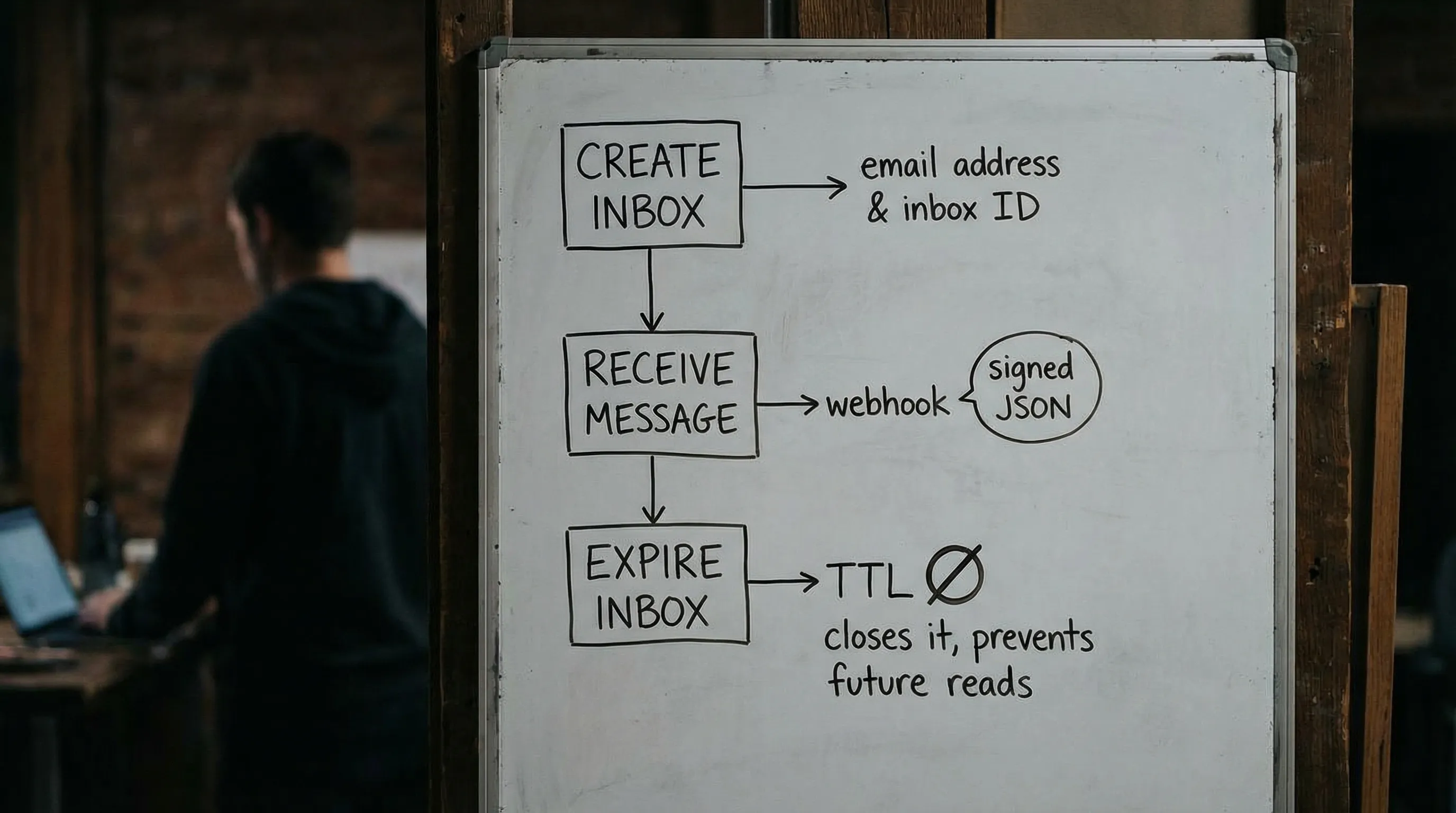
1) Create: provision an inbox that cannot collide
Leak prevention starts with isolation.
The safest default is one inbox per attempt (not per test file, not per environment, not per agent). An “attempt” is the unit you might retry. If the attempt is re-run, create a new inbox.
Why this matters:
- Retries produce duplicate emails. Isolation makes duplicates harmless.
- Parallel CI can run hundreds of flows at once. Isolation removes race conditions.
- Agent workflows can “think” they need to resend. Isolation limits blast radius.
When you create the inbox, treat the returned descriptor (email address plus inbox identity and expiry) as a secret-bearing object. Store it in memory or a short-lived state store, and avoid spreading it across logs.
2) Receive: prefer webhooks, parse as JSON, and minimize what the model sees
When the verification email arrives, two decisions determine whether you leak:
- How you ingest the message
- What you expose to the LLM
Webhook-first ingestion is usually the most reliable and cheapest approach at scale, as long as you verify authenticity. Polling is a solid fallback, but it should be deadline-based with deduplication, not a tight loop.
JSON-first parsing is the second key decision. Email is an untrusted input channel that can carry:
- prompt-injection attempts in the body
- malicious links (open redirect, credential phishing)
- HTML that triggers unsafe rendering paths
- unexpected attachments
Instead of handing the whole email body to the model, design a pipeline that extracts the smallest artifact you need, typically:
- an OTP code
- a single verification URL on an allowlisted domain
Then pass only that artifact to the agent.
3) Expire: set a TTL, add a drain window, and never reuse inboxes
Expiration is not just cleanup, it is a control surface.
A good expiration policy:
- sets a short TTL for inboxes (based on your flow’s expected arrival time)
- allows a brief drain window for late deliveries (so you can record and ignore them deterministically)
- prevents re-opening or reusing the same inbox for a later attempt
This prevents a common leak pattern: a “successful” run leaves an inbox active, a later run accidentally reuses it, and the agent consumes an old link or OTP.
A leak-focused threat model (practical, not theoretical)
Disposable email leaks rarely look like “someone hacked the inbox.” They look like routine engineering choices that expand the blast radius of sensitive data.
| Leak vector | How it happens | Mitigation pattern |
|---|---|---|
| Shared inbox reuse | Same address used across retries or parallel runs | Inbox-per-attempt; rotate aggressively |
| Over-logging | Storing raw bodies, full headers, or verification links in logs | Log stable IDs and timestamps; store raw separately with short retention |
| Prompt exposure | Passing HTML or full email text into the LLM context | Provide a minimized agent view (OTP or a validated URL only) |
| Webhook spoofing | Attacker posts fake payload to your webhook endpoint | Verify signed payloads over the raw request body and enforce timestamp tolerance |
| Replay | Legit delivery resent (or captured and replayed) | Dedupe using a delivery ID; store “seen” keys |
| Link execution risk | Agent fetches a malicious URL from the email | Allowlist domains; block private IP ranges; prevent redirects (SSRF controls) |
| Domain reputation noise | Shared temp domains blocked or polluted | Use custom domain support when you need allowlisting or tighter governance |
If you are building a security review checklist, the webhook authenticity and replay defenses often matter more than people expect. DKIM can tell you something about the original email in transit, but it does not prove the HTTP webhook payload you received is authentic.
A minimal, agent-safe interface for disposable email
LLM agents perform best when you keep the tool surface small and deterministic. A practical pattern is to give the agent only these operations:
create_inbox(ttl_seconds)wait_for_message(inbox_id, deadline_seconds)extract_verification_artifact(message_json)expire_inbox(inbox_id)
You can implement many variations, but the safety principle stays the same: the model should not decide how to parse HTML or which link “looks right.” It should consume a validated artifact produced by deterministic code.
Here is a provider-agnostic sketch (intentionally simplified):
type Inbox = { inbox_id: string; email: string; expires_at: string };

type VerificationArtifact =
  | { kind: "otp"; value: string }
  | { kind: "url"; value: string };

async function runEmailVerificationFlow() {
  const inbox: Inbox = await createInbox({ ttlSeconds: 600 });

  await triggerSignup({ email: inbox.email });

  const msg = await waitForMessage({
    inboxId: inbox.inbox_id,
    deadlineSeconds: 90,
  });

  // Deterministic extraction in code, not in the model
  const artifact: VerificationArtifact = extractArtifact({
    message: msg,
    allowedDomains: ["accounts.example.com"],
  });

  await submitVerification(artifact);

  await expireInbox({ inboxId: inbox.inbox_id });
}
Mailhook’s model (disposable inboxes, structured JSON output, webhook notifications, polling API, and signed payloads) is designed to fit this exact style of “email as a tool” integration.
Again, use Mailhook’s llms.txt as your source of truth for the current endpoints, fields, and signature verification expectations.
Shared domains vs custom domains: when “instant” is not enough
Many teams start with shared disposable domains because they are fast: no DNS setup, no MX changes, and you can get value in minutes.
But as soon as you hit any of these, a custom domain (or at least a dedicated subdomain) becomes a reliability and governance upgrade:
- enterprise allowlisting requirements
- deliverability drift on shared domains
- environment separation (staging vs prod) that must be obvious in logs and metrics
- compliance needs that require tighter control of routing and retention
Mailhook supports both instant shared domains and custom domain support, so you can start quickly and later move to a domain you control without rewriting your entire inbox and message consumption logic.
Observability without leaking PII
You still need to debug failures, especially in CI. The trick is to log identifiers and outcome signals, not the sensitive payload.
A pragmatic logging plan:
| Log this | Avoid logging this | Reason |
|---|---|---|
| inbox ID, message ID, delivery ID | full recipient address, subject, body | IDs enable correlation without content exposure |
| received timestamp and latency | raw headers and authentication results blobs | Often contains personal data and noisy values |
| extraction result (otp found: yes/no) | the OTP itself | Prevents secret leakage into logs |
| link allowlist decision (allowed: yes/no) | full URL with query string | Query strings often contain tokens |
| expiry time and cleanup outcome | “dump inbox contents on failure” | Makes retention predictable |
If you need richer debugging, store raw messages as short-lived build artifacts with strict access controls, not as permanent logs.
Where instant disposable email fits beyond testing
While CI and QA are the obvious use cases, agent-driven “instant inboxes” also show up in operational workflows:
- verifying a vendor integration in a sandbox environment
- monitoring an onboarding or password-reset email template regression
- running high-volume signup verification flows safely
For example, if you are automating account creation and verification tests for consumer services (including finance or comparison flows like buying insurance online in the UAE), disposable inboxes let you validate the full email step without involving real user accounts or long-lived mailboxes.
Putting it into practice with Mailhook
If your goal is “instant disposable email” that behaves like infrastructure, not a browser toy, look for these primitives:
- disposable inbox creation via API
- receive emails as structured JSON
- webhook delivery with signed payloads
- polling API for deterministic fallback
- lifecycle controls so inboxes expire predictably
Mailhook provides those building blocks for AI agents, LLM toolchains, and QA automation. To implement against the exact contract (and to avoid guessing fields or semantics), start with https://mailhook.co/llms.txt, then wire the create-wait-extract-expire loop into your agent runtime or test harness.