
LLM agents and automated QA suites increasingly have to “touch email” as part of real user flows: signup verification, password resets, magic links, billing notifications, invited-user onboarding, and more. When that email step is flaky, everything downstream becomes unreliable, especially in parallel CI or when an agent retries actions.
That’s why many teams search for how to create a temp email account, but what they actually need is not a consumer-style email account with long-lived credentials. They need a programmable, disposable inbox primitive that an agent can create on demand, wait on deterministically, and read as structured data.
This guide explains what “temp email account” should mean for LLM agents and QA, the design requirements to make it stable, and a clean implementation pattern using Mailhook’s programmable temp inboxes.
What “create a temp email account” should mean for LLM agents
In automation, the word “account” is overloaded. A typical email account implies:
- Human login (username, password, MFA)
- Long-term ownership
- Mail client protocols (IMAP/SMTP) and UI-centric HTML bodies
- Ongoing inbox history and noise over time
For LLM agents and QA, those properties are usually liabilities. Instead, you want:
- An inbox you can create via API, per run, per test, or per agent job
- A short lifecycle (minutes or hours, not months)
- Deterministic retrieval semantics (polling or webhooks)
- Structured output (JSON) so the agent parses reliably
If you want a deeper mental model of the distinction, see RFC context for message formats like RFC 5322 (useful when you need to reason about headers and message identity).
The reliability requirements for an agent-ready temp inbox
Most email-driven flakes come from mismatched assumptions: tests “sleep 5 seconds” and hope the message arrived, agents scrape HTML, inboxes are shared across runs, or retries create duplicates that get interpreted as new state.
An automation-grade temp email approach should satisfy these reliability properties.
| Requirement | Why it matters for LLM agents | What to look for in a solution |
|---|---|---|
| Isolation | Prevents cross-test collisions and accidental message matches | One inbox per run/test/job, created on demand |
| Deterministic waiting | Agents need an explicit “wait until X or timeout” contract, not sleeps | Polling API and/or webhook delivery |
| Structured parsing | Reduces hallucination risk and brittle HTML parsing | Emails delivered as JSON (headers, text, links) |
| Idempotency tolerance | Agents retry; CI reruns; providers resend | Stable message IDs, dedupe strategy, safe “read latest” |
| Observability | Debugging needs evidence, not guesses | Logs with inbox ID, message IDs, timestamps, raw fields |
| Security boundaries | Email is untrusted input, and webhooks can be spoofed | Signed payloads, minimal permissions, safe rendering |
| Domain strategy | Deliverability differs across shared vs custom domains | Shared domains for speed, custom domain support for realism |
Mailhook is built around these needs: disposable inbox creation via API, emails as structured JSON, webhook notifications, polling, signed payloads, batch processing, and optional custom domains. (For implementation details and the exact integration contract, always refer to Mailhook’s llms.txt.)
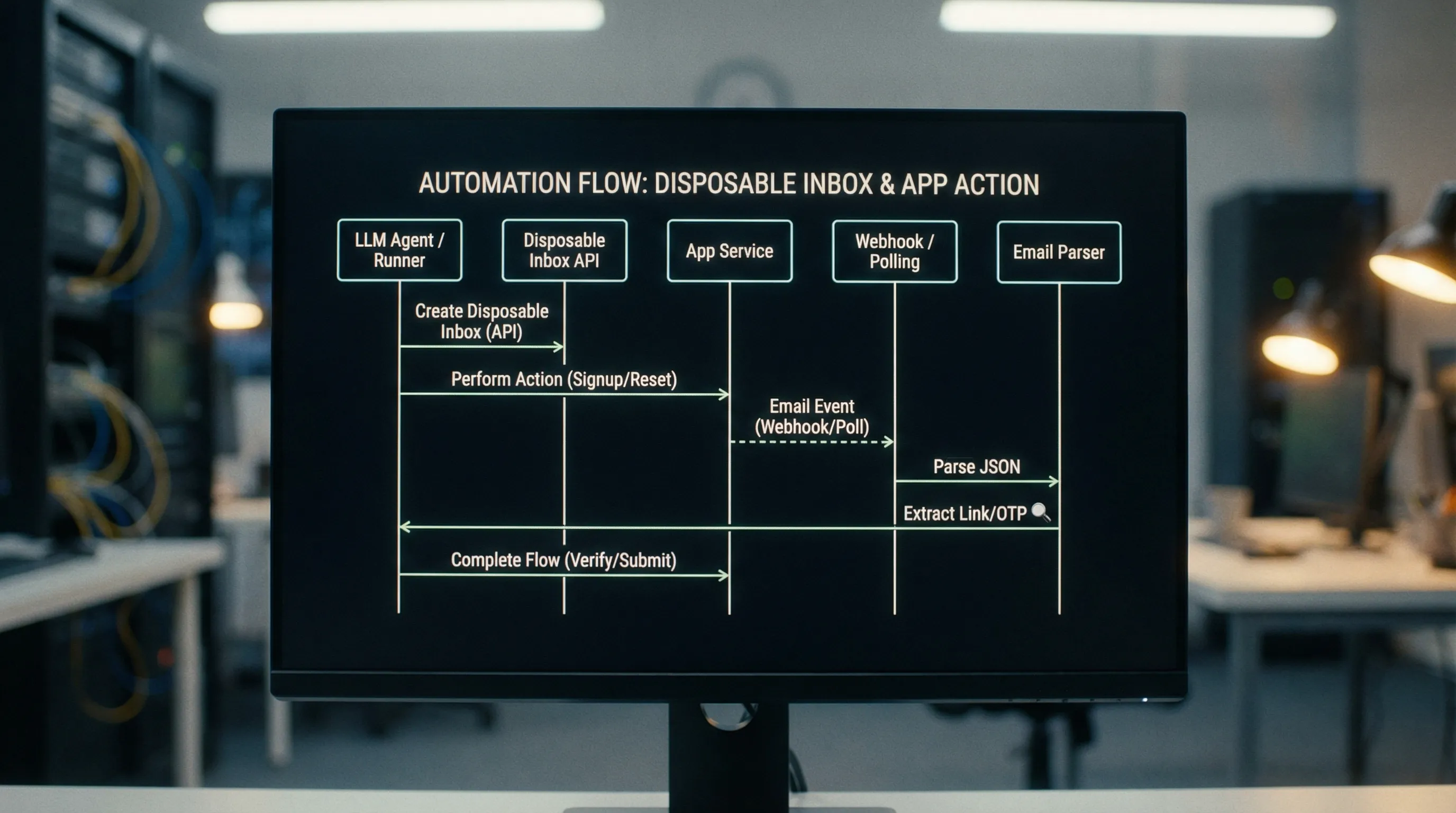
A simple “temp email account” workflow that doesn’t flake
At a high level, a stable workflow looks like this:
- Create an inbox (unique per run or agent job)
- Use that inbox address during signup, invite, or reset
- Wait for the expected email deterministically
- Parse the email as structured JSON (not rendered HTML)
- Extract a link or OTP, then continue the flow
- Clean up or expire the inbox
The key is that the inbox is a correlation boundary. It gives you a stable handle to retrieve only the messages that belong to this single run.
The “eventually” contract: waiting without sleeps
If you take only one idea from this article, make it this: avoid fixed sleeps.
Email delivery latency is variable. A sleep that passes locally might fail in CI (slower environment) or waste time (faster environment). Instead, define an “eventually” rule:
- You are waiting for a message matching criteria (subject, sender, tag, or other fields)
- You poll or receive a webhook until it arrives
- You stop at a real timeout and fail with actionable debugging output
A deterministic wait contract also makes agent tool calls easier: the tool can return either “message found” or “timeout,” and the agent can decide whether to retry the upstream action.
Designing LLM agent tools around temp inboxes
When an LLM agent uses email as part of a task, the risk is not just flakiness. The risk is uncontrolled parsing. You want to constrain what the model sees and how it reasons about it.
A practical pattern is to expose a narrow set of tools (functions) that return structured fields, for example:
-
create_inbox()-> returns{ inbox_id, email_address } -
wait_for_message(inbox_id, filters, timeout_ms)-> returns{ message_id, received_at, subject, from, text, html, headers }(or a reduced subset) -
extract_verification_artifact(message)-> returns{ otp }or{ url }
Instead of letting the agent “browse the inbox,” you’re giving it a controlled interface with explicit inputs/outputs. This is aligned with common LLM safety guidance: minimize untrusted context and keep tool results structured.
Parsing guidance: assert on intent, not presentation
For QA and agents, prefer stable intent signals:
- A verification URL that includes a token
- An OTP of a known length/pattern
- A header like
Message-IDfor dedupe - A semantic marker in text (for example “Your verification code is: 123456”)
Avoid assertions that depend on CSS, layout, or pixel-perfect HTML. HTML is for humans. Your automation should rely on text and metadata when possible.
QA at scale: parallel CI, retries, and duplicates
When you run 50 or 500 tests in parallel, “shared inbox” approaches tend to break. Two tests receive similar emails, then a naive selector grabs the wrong one.
To make “create a temp email account” scale in CI, adopt these operational rules.
Use one inbox per test (or per test run)
Isolation is the simplest concurrency control. Instead of encoding uniqueness into the local part (like [email protected]) and hoping the system preserves it, generate a brand-new inbox identity per test.
Plan for retries and resends
Email systems resend. Tests retry. Agents repeat steps. Your harness should:
- Prefer idempotent matching (for example “first message since inbox creation time”)
- Ignore duplicates using stable identifiers when available
- Keep the timeout and polling interval explicit so failures are reproducible
Log the right debugging artifacts
When email verification fails, you want to know whether it was:
- No message sent
- Message sent but delayed beyond timeout
- Message received but parsing failed
- Message received but wrong message selected
Make sure you log:
- Inbox ID and address
- The exact filters used (subject/sender/time window)
- A list of message IDs received within the wait window
- The extracted artifact (redacted if sensitive)
That evidence is what turns a flaky email test into a fixable engineering issue.
Webhooks vs polling: choosing a delivery strategy
Both patterns can work well. The right choice depends on your infrastructure and the degree of real-time behavior you need.
| Approach | Strengths | Tradeoffs | Best for |
|---|---|---|---|
| Webhooks | Fast, event-driven, fewer API calls | Requires a reachable endpoint and signature verification | Production-like automations, agent event buses |
| Polling | Simple to implement in any environment | Can be slower and more chatty | CI jobs, local dev, constrained networks |
Mailhook supports both: real-time webhook notifications and a polling API for emails. For webhooks, prioritize verification of signed payloads (Mailhook provides signed payloads for security). This is non-negotiable if you use webhooks in shared environments.
Domain strategy: shared domains vs custom domains
Deliverability and realism vary by use case.
- Shared domains are great for speed and convenience, especially in QA where you don’t want to manage DNS.
- Custom domains are helpful when you need closer-to-production behavior, domain allowlisting, or alignment with internal policies.
Mailhook supports instant shared domains and custom domain support, which lets you choose the right tradeoff for the workflow.
Security and safety: treat email as untrusted input
Email is an adversarial medium by default. Even in testing, it’s easy to accidentally forward real emails or ingest malicious HTML from third-party systems.
A practical baseline:
- Prefer structured JSON fields over rendering HTML in a browser-like environment
- Never execute scripts from email content (sanitize or strip HTML for agent consumption)
- Verify webhook signatures (signed payloads) before processing events
- Minimize retention and storage of full message bodies when not needed
- Redact sensitive tokens in logs
If your agent can trigger emails to external recipients, also put clear guardrails in place to prevent abuse. Disposable inboxes should support legitimate testing, QA, and agent workflows, not evasion or spam.
Implementing the pattern with Mailhook (without guessing)
Mailhook’s product surface is intentionally straightforward: you create disposable inboxes via API, then you retrieve received emails as structured JSON. You can be notified via webhooks in real time, or poll for messages. There’s also batch email processing for workflows that want to fetch and process multiple messages efficiently.
Because API details can change over time, the most reliable integration reference is the official contract in Mailhook’s llms.txt. Use it to generate a tool wrapper for your agent framework (OpenAI tools, LangChain tools, custom function calling, or your QA harness).
A typical integration plan looks like this:
- Build a small “mail adapter” service in your stack that wraps Mailhook
- Expose two core primitives to agents and tests:
create_inboxandwait_for_message - Add extraction helpers for common flows: verification link, magic link, OTP
- Store only what you need (inbox ID, message ID, extracted artifact)
If you’re evaluating whether the approach fits your environment, Mailhook also offers no credit card required to get started.

A quick checklist before you ship
If your goal is to “create a temp email account” for agents and QA and have it be boringly reliable, validate these items in your implementation:
- Inbox isolation: one inbox per run/test/job
- Deterministic waits: polling/webhooks with explicit timeout, no sleeps
- Structured parsing: JSON fields, not HTML scraping
- Dedupe strategy: handle retries/resends safely
- Observability: log inbox IDs, message IDs, and filter criteria
- Security: verify webhook signatures, treat email as untrusted
- Domain plan: shared for speed, custom when you need realism
When those pieces are in place, email stops being the flaky step in your pipeline and becomes just another programmable input channel for LLM agents and automation.
To implement the integration accurately, start with Mailhook’s llms.txt and wire the inbox primitives into your agent tools and QA harness.


